Paylocity employee texting covers three narrow areas: Text to Apply for job candidates, pre-boarding reminders for new hires who supply a mobile number, and, since September 2025, SMS alerts for Community announcements. Everything else in the platform, including Community Plus chat, lives inside the Paylocity app or web portal and reaches employees through push notifications, not text. Paylocity does not document continuous two-way texting for shift swaps, call-offs, or manager questions: the ongoing conversations SMS-based platforms like Yourco are built to carry. For a frontline workforce that rarely checks company email, that distinction decides whether an announcement, a shift change, or a call-off actually gets seen.
TL;DR
- Paylocity offers true SMS for a limited set of employee and candidate workflows.
- Community Plus chat is in-app messaging; employees need the Paylocity app or a web login to see it, and its alerts arrive as push notifications rather than texts.
- Paylocity's public documentation does not describe continuous two-way SMS for shift swaps, call-offs, or manager-to-employee conversations.
- Employers can settle opt-in records and off-the-clock time for hourly employees while keeping personal numbers private before texting a frontline workforce.
- SMS-based platforms like Yourco add app-free, two-way texting alongside a Paylocity HRIS and automatically sync employee data.
What Paylocity Employee Texting Covers Natively
Text to Apply is the best-documented Paylocity texting feature. A candidate texts a keyword such as "JOBS1234" to an employer-specific number and gets back an automated welcome message with a link to that employer's promoted jobs, according to Paylocity's recruiting text terms.
The application itself happens on the web. The application form gates recruiter-initiated two-way texting with candidates on consent; Paylocity's Recruiting product page describes sending "mass texts" to candidates.
Onboarding reminders work only when the new hire has supplied a mobile number. Paylocity's January 2023 release notes state that the platform can automatically text new hires about important tasks they need to complete before their first day and remind them to download the mobile app. It's a one-time nudge, not the ongoing back-and-forth SMS-based platforms like Yourco keep open with a new hire.
The newest Paylocity employee texting documentation appears in Paylocity's September 2025 release notes, which describe sending Community announcements to employees' phones via SMS, with each message carrying a link to the full announcement in Community, and state that employees "can reply '1' to confirm receipt," which gives HR real-time acknowledgment stats. The reply confirms receipt and ends there.
Paylocity's documentation does not state the pricing tier or explain the opt-in and opt-out mechanics for this feature. Each feature supports a bounded notification or confirmation workflow, which works for a candidate or announcement but not an ongoing shift conversation.
SMS-based platforms like Yourco pick up exactly where each of these leaves off: the same number that sends a shift reminder can also field a manager's follow-up question and log the employee's reply. One number carries the full exchange instead of resetting to a single alert every time a new message goes out.
Paylocity Employee Texting vs. Community Plus Chat
Community Plus delivers in-app chat through the Paylocity app or web portal. Paylocity launched it on April 20, 2022, as a paid add-on to the base Community feed that includes one-to-one and one-to-many chat, team groups, and file sharing, according to Paylocity's launch announcement.
The app store listing describes chat alerts as push notifications. Paylocity employee texting documentation does not describe Community Plus chat delivering to an employee's default texting app.
This delivery architecture determines whether production-floor employees receive an update. A push notification needs the app installed, an active login, and notification permission; an SMS needs only a phone number, and SMS messages see read rates around 98%, an industry-standard benchmark for the channel.
Paylocity's own manufacturing industry page acknowledges the problem: "Not all employees have access to a computer or a corporate email address, so they don't see important updates or company-wide messages." The September 2025 SMS alert improves access to urgent announcements because the text itself lands without the app, but the full announcement opens in Community.
SMS-based platforms like Yourco send the same update as a text the phone already has, with no app, login, or permission step in between. That is why an SMS-first channel typically reaches employees that Community Plus chat cannot.
Where Paylocity Employee Texting Stops
Limited computer access and irregular schedules make frontline workers harder to reach. Each Paylocity employee texting feature supports a one-time or one-directional workflow.
A platform must log every shift swap from request through approval, while call-offs at 4:30 a.m. still need to reach a supervisor and HR with a timestamp. Managers also need to ask questions like "Can you cover the second shift Thursday?" and receive a reply.
These workflows require ongoing conversations, while Paylocity's SMS features support only single alerts or confirmations. Supervisors fall back to texts and calls from personal phones, then change schedules manually with no record HR can pull.
88% of HR leaders need a reliable way to reach frontline employees while only 55% are confident they already have one, according to a Yourco-commissioned survey of 150 HR leaders, which is why shift swaps and call-offs keep landing on a supervisor's personal phone. SMS-based platforms like Yourco give supervisors a company-owned channel for that back-and-forth, not a one-time alert.
Great Day Improvements (GDI), a vertically integrated, direct-to-consumer provider of premium home improvement products operating across 338 locations, saw its overall Communication Score rise from 49% to 53%, a 4 percentage-point improvement, after moving frontline messaging onto one platform built for both broadcast and two-way conversation. Before making that change, it is worth settling how consent, off-the-clock pay, and privacy work for a frontline, hourly workforce.
Opt-In, Off-the-Clock, and Privacy Practices Before Texting
Before using Paylocity employee texting, employers can assess how the Telephone Consumer Protection Act (TCPA) applies to texts they send to their own employees. Employers can collect a mobile number for employment purposes with an acknowledgment of how they will use it, gather that acknowledgment alongside other onboarding paperwork, and note that messages cost the employee nothing when the employer covers messaging fees. Since April 11, 2025, employers can also honor revocation requests sent by any reasonable method.
Hourly employees' time spent reading or answering work messages also counts as work time. The U.S. Department of Labor's Fact Sheet #22 states that under the Fair Labor Standards Act (FLSA), employers must pay employees for work they permit, even when they did not request it. A written process can record time spent on after-hours work messages.
A company-owned number for business texting keeps a personal device out of the conversation entirely. Many employment attorneys recommend exactly this separation: a work number employees use for shift-related texts, kept apart from whatever personal phone they use off the clock. When a supervisor texts from a personal phone instead, the message history leaves with that phone, and a records request can reach for the device itself.
Written workplace texting rules for Paylocity employee texting can include:
- At onboarding, employers collect an opt-in acknowledgment and retain it with consent records; the platform honors STOP and HELP keywords, and HR holds a conversation before finalizing an opt-out so the employee knows which safety and schedule updates they will stop receiving
- For non-exempt employees, written rules set no expectation that they read or answer work texts outside scheduled hours and allow exceptions only for emergencies or schedule changes needing attention within 24 hours, plus a procedure for reporting any after-hours time spent on work messages
- Train managers to text only from the company-owned number
- When a manager or employee leaves, the platform maintains the message archive
These written rules define consent, after-hours pay, manager phone use, and record retention for workplace texting.
A company-owned number, keyword handling, and an archive come with SMS-based platforms like Yourco, backed by platform security controls such as encryption and role-based access, rather than a policy memo, which takes several items off HR's plate. With those ground rules settled, the feature-by-feature picture below shows exactly where Paylocity's native texting ends and where continuous two-way SMS picks up.
This information is for general awareness only. For specific compliance guidance, consult with qualified legal professionals.
Paylocity vs. Yourco: Texting Features Side by Side
For current employees, Paylocity employee texting sends SMS outward and accepts at most a single confirmation digit, while ongoing conversation lives in the app, where frontline adoption can stall, the exact problem a dedicated texting platform is built to solve. The table below compares each native Paylocity texting feature with what continuous, two-way SMS adds.
The best communication tools for these workforces add that fifth row without an app download.
Add Continuous Two-Way SMS to Paylocity With Yourco
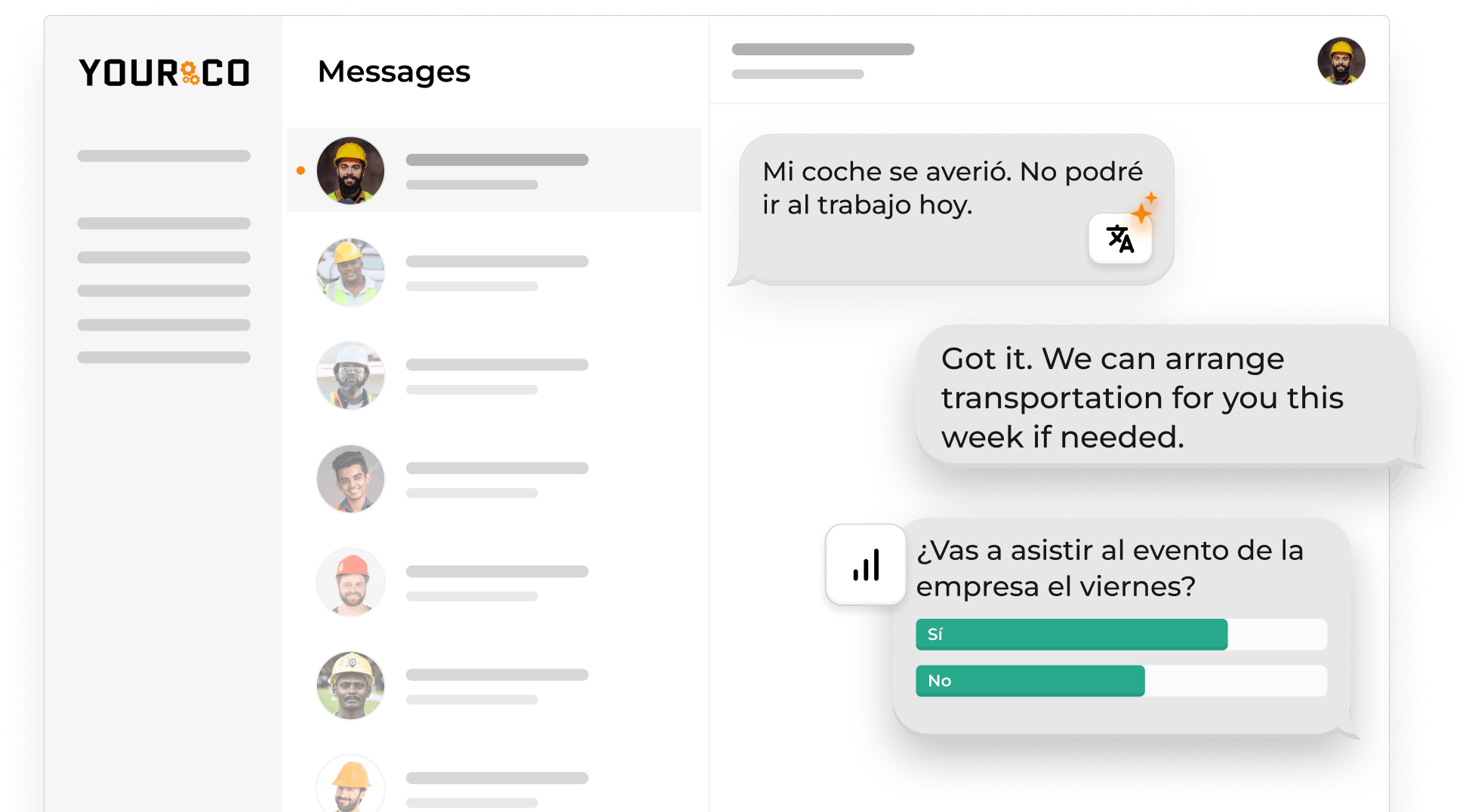
Paylocity is the system of record: it stores employee data, runs payroll, and provides basic texting for company-wide announcements. Yourco is the communication layer: it extends that system of record into an ongoing, two-way conversation with every employee on the roster, through the texting app already on their phone. Supervisors text from a company-owned number instead of a personal one, and every reply lands in the same archived, timestamped thread. Shift swaps, 4:30 a.m. call-offs, and a quick question about Thursday's coverage all run through that one documented channel.
Three capabilities make that possible:
- SMS to any phone: no app download or Wi-Fi required, so messages reach basic flip phones as easily as smartphones.
- Two-way messaging: employees reply from the same thread, whether that means confirming a shift swap or answering a supervisor's question.
- AI-powered translation across 135+ languages and dialects: each employee reads and replies in the language they are most comfortable with.
The AI Call-Off Agent is the clearest example of why a dedicated communication layer matters, because it shows the full path a message takes: Paylocity holds the employee record and triggers the notification; Yourco opens a two-way conversation so the employee can actually report the absence; the AI Call-Off Agent runs the automated workflow, asking follow-up questions until it has what HR needs and confirming with the employee; and the result is a standardized, timestamped record that flows back into that same system of record. Paylocity's own texting features stop at the first message; they don't carry a conversation through that workflow.
Yourco also syncs with 240+ HRIS integrations, so new hires, terminations, and role changes flow into the messaging roster automatically.
For organizations with 2,001+ employees, Enterprise Bridge scales communication across locations: it gives corporate leadership a one-way broadcast channel to every location while local managers keep their own two-way conversations.
Frontline Intelligence helps HR and leadership understand frontline interactions across every location, not just log them. It provides centralized visibility into texting activity, tracks policy acknowledgment rates and flags message fatigue before it turns into an opt-out. Leaders can ask directly which locations are slowest to confirm a policy update, or where opt-out requests are rising month over month. Corporate teams see the same view across every site instead of waiting on a local manager's summary and can adjust cadence or wording before disengagement spreads.
"We have nearly 700 employees and 80% are non-desk based, communication is a challenge. Yourco provides a quick easy way to reach everyone and a secure way for employees to reach HR and leadership without a computer."
— Felisha Parker, VP Human Resources, McCarthy Auto Group
After 90 days on Yourco, companies see two-way employee engagement reach 86%.
Try Yourco for free today or schedule a demo and see the difference the right workplace communication solution can make in your company.

Frequently Asked Questions About Paylocity Employee Texting
Does Paylocity Have Text Messaging to Employees?
Paylocity employee texting sends true SMS to employees for pre-boarding task reminders and Community announcement alerts, while Text to Apply serves candidates. Ongoing employee conversations, including Community Plus chat, run through the Paylocity app or web portal rather than the employee's texting app. Paylocity does not document continuous two-way employee SMS.
Is Paylocity Community the Same as SMS?
Paylocity Community uses an in-app and web feed for announcements, groups, and recognition; Community Plus adds chat through the same platform. Paylocity employee texting can send an SMS alert for a Community announcement and confirm receipt, but the complete announcement still opens in Community.
Can Paylocity Text Employees About Shift Changes or Call-Offs?
Paylocity employee texting documentation describes mobile notifications for shift changes but does not describe call-offs as an ongoing SMS workflow. SMS-based platforms like Yourco add the two-way texting Paylocity's notifications don't provide, handling shift swaps and absence reporting while supervisors manage questions in the same timestamped company record.
Do I Need Employee Consent to Text Through Paylocity?
Employers can document employee consent before using Paylocity employee texting. They can collect an acknowledgment when employees provide a mobile number and maintain a process for revocation requests. The Telephone Consumer Protection Act, Federal Communications Commission rules, and state laws such as Florida or Texas laws may apply. This is general awareness, not legal advice.