


Manufacturing employee onboarding often fails at the first step when the process assumes a company email address a factory-floor hire does not have. Forms go unsigned, first-shift instructions arrive too late, and new hires can disengage before they ever report to the plant. Building onboarding around the phone every worker already carries can keep paperwork, training, and day-one logistics on schedule. HR and operations leaders who run onboarding by text can reach a new hire from the offer through the first shift without ever routing through a company email account.
TL;DR
- Factory-floor workers rarely have company email, desks, or portal access.
- Texts deliver welcomes, form links, training reminders, and day-one logistics without apps or logins.
- Timed reminders starting soon after offer acceptance help reduce day-one no-shows.
- SMS handles communication and reminders; the human resources information system (HRIS), learning management system (LMS), and secure document storage stay the system of record.
- SMS-based platforms like Yourco give new frontline employees an accessible place to receive onboarding information and ask questions without requiring company email or another app.
Why Email-Based Onboarding Fails Factory-Floor Hires
According to a Yourco-commissioned survey of 150 HR leaders, 88% say they need a reliable way to reach frontline employees, while only 55% are confident they already have one.
A frontline employee often has no company inbox, desk, or reliable kiosk access, so building a channel around any of those requirements starts the relationship already behind. Company email falls short at nearly every stage of onboarding, since each step assumes an account, a password, and a desk a factory-floor hire does not have. Looking at what each stage requires shows why text clears those obstacles instead of adding a new system on top of them.
Each stage plays out differently depending on the channel:
Each row swaps a step that depends on an email account for one that works from the phone the hire already carries, which is the channel the rest of this guide builds on.
At Great Day Improvements (GDI), a home improvement provider operating across 338 locations, AI-powered translation lets company-wide announcements, executive messaging, and daily communications reach every employee in a preferred language, the same mechanism that lets a factory-floor hire read onboarding instructions in whichever language they understand best.
Use SMS as the Communication Layer, Not the System of Record
Which system holds the record is an organizational decision, not a communication-channel one, and getting it wrong leaves onboarding paperwork scattered across whatever device a supervisor happened to text from. SMS-based platforms like Yourco keep that decision clean: Yourco reaches a new hire’s phone to deliver reminders, answer questions, and confirm receipt, while the HRIS, payroll, e-signature, or document-management workflow remains the system that creates, stores, and can produce the record.
Keep Social Security numbers, bank details, medical information, full identity documents, and signed compliance records out of ordinary message bodies. A secure, access-controlled platform is where that data belongs, not a text thread, which is also why platform security controls such as encryption, access permissions, and message logging matter even though the text itself only carries a link.
The distinction matters most for Form I-9. A new hire can complete steps of an electronic I-9 through a compliant system, and SMS can deliver the secure link and deadline reminder, but the text itself does not substitute for the verification, electronic signature and recordkeeping controls that system performs.
This information is for general awareness only. For specific compliance guidance, consult with qualified legal professionals.
The same split applies across onboarding, not just the I-9:
With that boundary set, the rest of this guide covers when to send each message, from the offer through ongoing check-ins after the first shift.
Start Onboarding Within 24 Hours of Offer Acceptance
Start preboarding as soon as possible after offer acceptance, ideally within 24 hours. Leaving a new hire in a pre-start dead zone can increase uncertainty and disengagement before they report to the plant.
A core SMS preboarding sequence for a new hire covers:
- A welcome text from HR, the plant manager, or the direct supervisor on acceptance day.
- Shift, start date, address, parking, entrance, dress code, personal protective equipment (PPE), and identification (ID) requirements.
- Secure links and reminders for forms.
- A reply channel for transportation, paperwork, or schedule questions.
- Reminders one week, three days, and one day before the first shift.
Many employers capture SMS opt-in consent in the offer paperwork as part of a simple onboarding acknowledgment, with the specific notice and opt-out language varying by jurisdiction and message type.
Pulling each new hire’s HRIS information into a preboarding sequence keeps those messages specific to the person receiving them. In manufacturing employee onboarding without email, early answers about paperwork and rides, along with directions to the correct entrance, can reduce the uncertainty that contributes to day-one no-shows.
Give New Employees a Place to Ask Questions
Onboarding doesn't end when HR sends the information. New employees often have questions about where to report, what to bring, benefits, policies, or other onboarding details.
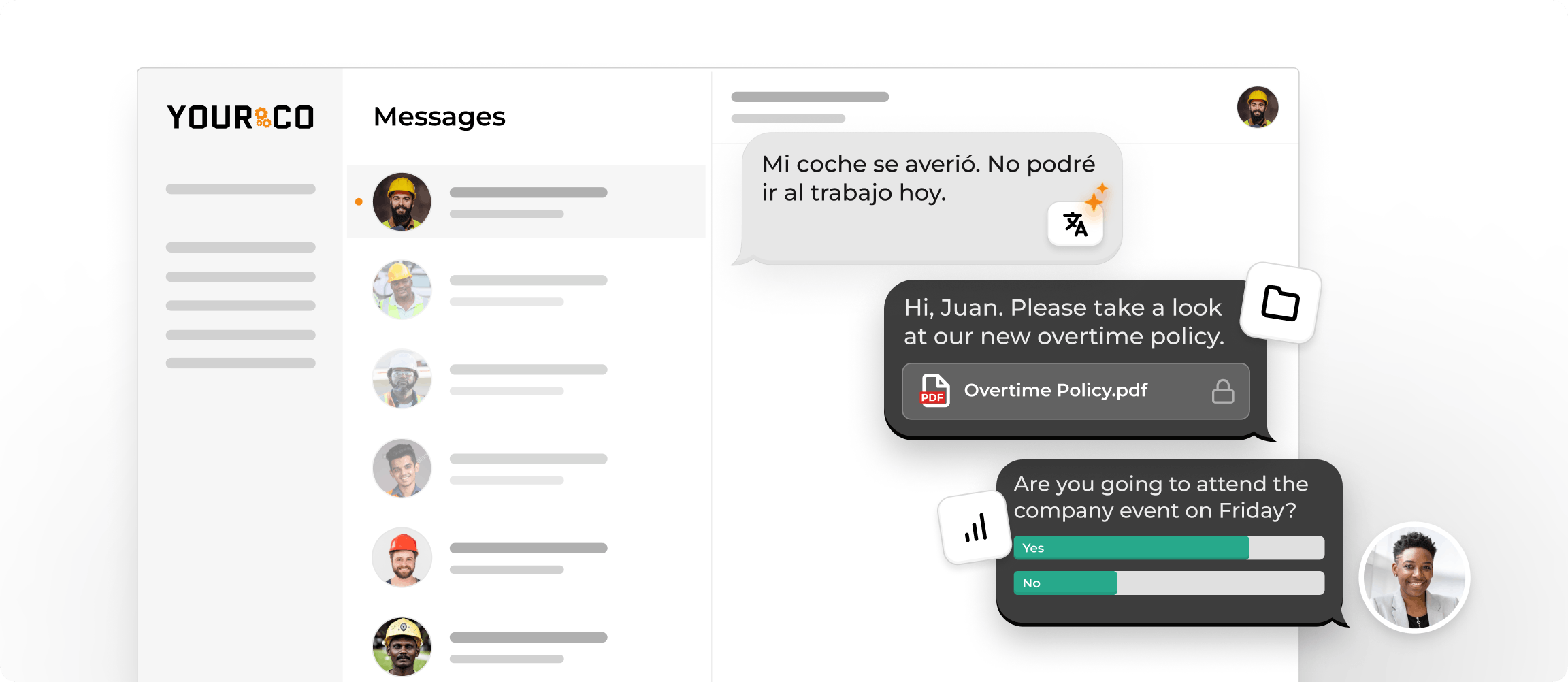
With Yourco's Onboarding Agent, employees can text questions through the same familiar SMS experience and get relevant answers based on approved onboarding materials. This gives new frontline employees an accessible place to get the information they need while reducing repetitive document distribution, follow-up, and Q&A for HR and managers.
Deliver Forms and Required Documents by Text
For manufacturing employee onboarding without email, text delivers secure document links and photo requests to a new hire’s phone without a company email account, along with deadline reminders.
Text also covers:
- Set a deadline for payroll and tax forms.
- Send reminders about direct-deposit setup.
- Collect worker acknowledgment of attendance, safety, and conduct policies.
- Send separate reminders for ID and badge requirements.
- Include prompts for facility access and benefits enrollment.
Manufacturing employee onboarding without email moves paperwork forward through these messages, while the secure system handles sensitive records.
Employers can route Form W-4 and direct-deposit forms through an approved electronic-signature or HRIS workflow, with the text itself delivering only the link. Managers compose and dispatch these messages from a web dashboard, giving HR one timestamped record per employee instead of threads scattered across personal phones or group chats.
Send Training and Safety Information Straight to the Floor
Manufacturing employee onboarding without email also needs a clear path for training and safety information, and text messages handle that without assuming a company inbox or a smartphone. A new hire confirms receipt by replying or completes a short on-site module.
Send short pieces:
- Provide hazard sheets for the assigned area.
- Mark muster points on a facility map.
- Cover job-specific procedures, such as changeover standards.
- Remind new hires about training that follows Occupational Safety and Health Administration (OSHA) standards, such as hazard communication standards, lockout/tagout, and PPE, as well as the plant’s acknowledgment process.
- Where a new hire has a smartphone, link to a short orientation video or one-page summary.
A text can deliver the link, send the reminder, and follow up. The LMS and signed safety certifications remain the training records the plant maintains; a text acknowledgment is a reminder trail, not a substitute for that documented training.
This information is for general awareness only. For specific compliance guidance, consult with qualified legal professionals.
Clarify Day-One Logistics for the First Shift
Split day-one logistics into two timed texts: one the evening before and one the morning of the first shift. The texts should cover:
- Reporting time, with the exact location.
- Where to park, which entrance to use, and how security and badge pickup work.
- The supervisor’s name and contact information.
- PPE requirements and what the plant provides.
- What to do if the worker expects a delay or absence.
A sample sequence for one hire might look like this. The evening-before text confirms the start time, gate, parking lot, and arrival deadline, and invites a reply if transportation or access is a problem. The morning-of text repeats the check-in location and the supervisor’s name, and asks for an immediate reply if the hire expects to be late or absent.
SMS-based platforms like Yourco turn two-way texting into a real conversation: a supervisor using manufacturing text messaging can catch an access or attendance problem before the shift starts, so the new hire reaches the correct entrance and reports on time.
Handle a New Hire Who Goes Quiet Before Day One
A new hire who stops replying between the offer and the first shift is the clearest warning sign this process produces, and what a supervisor does next decides whether that silence turns into a no-show.
A few recurring moments decide whether that silence gets resolved or left to sit:
Treating a quiet thread as something to act on, rather than something to wait out, is what keeps a slow start from turning into a no-show on day one.
Reach Every New Hire on the Floor With Yourco
The manufacturing employee onboarding-without-email sequence, from offer text to later check-ins, can run through one channel. Yourco gives HR and plant leaders that channel, with security controls that store messages and attachments so HR can review each employee’s submissions:
- Yourco sends SMS to any phone, including basic flip phones, with no app download, Wi-Fi, or data plan required.
- With two-way messaging, new hires ask questions and supervisors answer in the same thread.
- Each hire can receive AI translations in their preferred language across 190+ languages.
- The AI Call-Off Agent collects a text reply when a new hire expects to be late or absent before the first shift, confirms the details with the hire, and automatically logs a timestamped record for the supervisor.
Yourco connects with 240+ HRIS and payroll systems to keep employee information current. With the Onboarding Agent, new frontline employees can text questions about the onboarding information available to them and get relevant answers based on approved company materials.
Enterprise Bridge allows one-way broadcasts from corporate leadership to the entire frontline, keeping every location aligned without requiring responses, while local HR teams keep direct two-way conversations with their own new hires.
Frontline Intelligence helps HR understand the questions and concerns coming up during onboarding across the workforce. Instead of reviewing conversations one by one, leaders can ask questions such as:
- What are new hires asking about most often?
- What questions are employees asking before their first shift?
- Are new hires across multiple plants confused about the same onboarding information?
“We have nearly 700 employees and 80% are non-desk based, communication is a challenge. Yourco provides a quick easy way to reach everyone and a secure way for employees to reach HR and leadership without a computer.”
— Felisha Parker, VP Human Resources, McCarthy Auto Group
After 90 days on Yourco, companies see two-way employee engagement reach 86%.
Try Yourco for free today or schedule a demo and see the difference the right workplace communication solution can make in your company.

Frequently Asked Questions About Onboarding Factory-Floor Workers Without Email
How Can I Onboard New Employees Who Work on the Factory Floor?
Onboarding factory-floor employees starts with reaching them on the device they already carry: a personal phone, by text. Send the offer confirmation, required forms, safety information, and shift details as short messages, and let the hire reply from that same phone, while HRIS and document systems keep the official record.
How Do You Onboard Employees Who Don’t Have a Company Email?
Use the personal mobile number the hire provided during hiring, after capturing appropriate SMS consent. Send welcome messages, secure form links, training reminders, and day-one logistics as short texts. The worker can reply from the same phone, while HRIS, LMS, and secure document systems retain the official records for manufacturing employee onboarding without email.
Can Employers Send New Hire Paperwork by Text Message?
Yes, employers can send a secure form link or protected photo request by text rather than attaching sensitive documents directly. The hire completes the form through the approved system or submits an image through a secure workflow. Social Security numbers, bank details, and other sensitive information should remain outside the message body.
Does a Text Acknowledgment Count as OSHA Training Documentation?
A text acknowledgment can provide a reminder trail, but it does not by itself satisfy an OSHA training requirement. Employers should maintain separate training records that address the applicable standard, including lockout/tagout or personal protective equipment procedures, with instructor sign-off or hands-on verification where the standard calls for it.
When Should Employers Start Manufacturing Onboarding After Offer Acceptance?
Employers should begin manufacturing onboarding promptly after the hire accepts the offer, with a welcome message and essential shift details. SMS-based platforms like Yourco can then deliver scheduled reminders before the first shift and continue check-ins throughout onboarding. This keeps communication active without requiring company email, an app, or a portal login.


