
The U.S. Department of Labor recovered $184 million in FLSA back wages in FY 2025. If you are chasing forgotten clock-outs and reconstructing timesheets at the end of every pay period, the problem is structural: your current system depends on workers remembering an extra step in an already demanding shift. The right platform shifts that burden from memory to technology, catching missed punches in real time before they reach payroll. This guide breaks down the platforms that do it best.
TL;DR
- Missed punches and forgotten clock-outs create payroll errors, inflate overtime costs, and open your operation to wage-and-hour compliance risk
- The best reminder platforms trigger alerts based on individual shift schedules, not blanket company-wide notifications
- Missed punch escalation to supervisors and two-way worker confirmation are the features that separate effective systems from basic notification tools
- Multilingual support matters because English-only reminder systems can leave multilingual crews confused about clock-in procedures
- SMS-based platforms like Yourco are the most accessible option for distributed frontline teams where app downloads, Wi-Fi, and data plans cannot be assumed
Understand Why Frontline Workers Miss Clock-Ins in the First Place
Before choosing a platform, it helps to understand why missed punches happen so consistently in frontline environments. The answer is rarely carelessness. It is structural.
Workers at dispersed job sites lack a physical time clock to prompt them. Rotating shifts and crew configurations mean a single missed entry during a handoff goes unnoticed until payroll. Workers moving fast through a dinner rush forget to punch back in after a break. These are environmental problems, not behavioral ones. A Yourco-commissioned survey of 150 HR leaders found that 85% say improved communication would reduce absenteeism, reflecting how directly the communication gap feeds attendance problems. The root causes typically fall into four categories:
- No physical clock at the work location: frontline workers across multiple locations lack the visual cue that prompts a punch
- Complex shift patterns: staggered starts, rotating crews, and split shifts make it easy to lose track
- Technology access gaps: Some workers may not have reliable smartphone access, data access, or practical access to app-based systems
- Language barriers: unclear clock-in instructions and schedule notifications can leave multilingual crews confused about procedures
When the system relies on the worker to remember an extra step during an already demanding shift, missed punches are inevitable. Automated reminders shift that burden from memory to technology, and the right platform makes that shift seamless.
Employee Clock-In Reminder Platforms at a Glance
Before selecting a platform, here’s how the leading clock-in reminder tools compare in terms of delivery methods, accessibility, and fit.
The most effective setups pair a purpose-built frontline communication layer with supporting tools for scheduling, automation, and compliance. Here is how the leading options break down.
1. Yourco
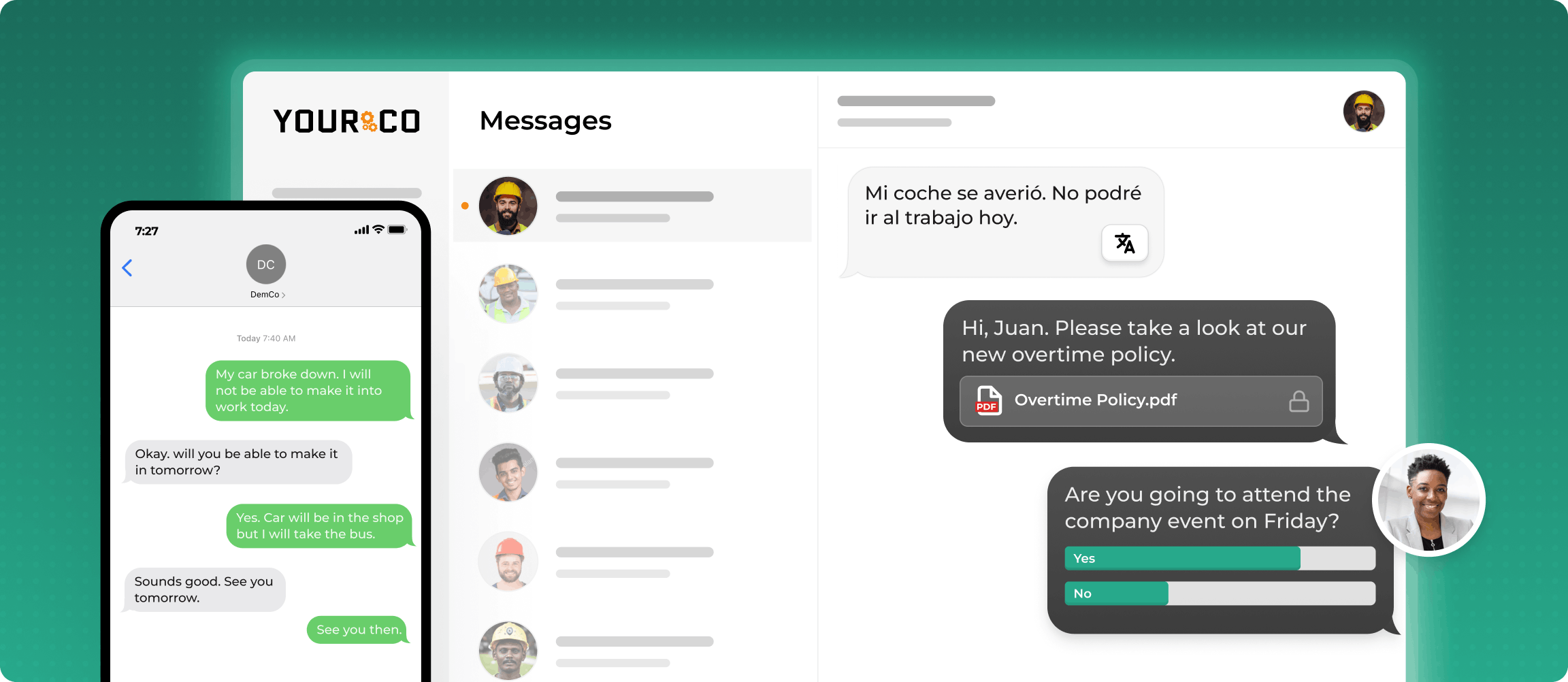
Yourco is the SMS-based employee communication platform purpose-built for frontline teams who cannot be reached through apps, email, or desktop systems. For clock-in reminder management, Yourco sends automated pre-shift texts timed to each worker's schedule and alerts supervisors when a worker fails to respond within a defined window. Workers reply directly from any phone to confirm attendance, report an absence, or flag a shift issue, creating a two-way confirmation loop that supervisors can monitor in real time.
Yourco requires no app download, no Wi-Fi, and costs employees nothing, making it the most accessible option for distributed, multilingual, or device-limited frontline teams.
Key features:
- Automated pre-shift and missed punch SMS reminders to any phone, including flip phones and basic devices
- Two-way messaging so workers can confirm attendance or report absences by replying to a text
- AI-powered translation across 135+ languages and dialects
- 240+ HRIS and payroll system integrations that sync shift assignments and employee data automatically
- Enterprise Bridge lets corporate leadership broadcast shift policy updates and attendance directives to all locations simultaneously
- Frontline Intelligence surfaces shift confirmation rates, call-off patterns, and absenteeism trends across every site in a centralized dashboard
Best for: Distributed, multilingual, or device-limited frontline teams where app adoption is a barrier and delivery reliability cannot be compromised.
2. Homebase
Homebase combines shift scheduling, clock-in tracking, and automated shift reminders into a single dashboard for hourly teams. When an employee misses a punch, managers receive a notification and can process corrections directly within the platform. It supports both app-based and web clock-in and includes a free tier for single-location teams.
Key features:
- Shift scheduling with automated pre-shift reminder notifications
- App-based time clock with missed punch detection and manager alerts
- Integrated payroll reporting and team messaging
Best for: Fixed-location hourly teams with consistent smartphone access who want scheduling and time-tracking in one tool.
3. Google Calendar
Google Calendar is a scheduling visibility tool, not a time-tracking platform. Supervisors can create shared shift events with automated email or push reminders, timed to each worker's start time. For teams already in Google Workspace, no additional software is required.
Key features:
- Automatic reminders by email or push notification tied to calendar events
- Shared calendars for shift visibility across supervisors and teams
- Native integration with Gmail and Google Workspace tools
Best for: Desk-connected supervisors who want lightweight automated reminders without a dedicated platform. Not suited as a standalone solution for frontline workers without consistent email or smartphone access.
4. Zapier
Zapier connects the tools you already use without custom development. For clock-in workflows, it triggers automated reminders when a shift begins, sends supervisor alerts when a punch is not confirmed within a set window, and syncs missed-punch flags between scheduling and payroll systems.
Key features:
- 7,000+ app integrations covering HR, scheduling, and communication tools
- Customizable triggers for shift start times and missed clock-in events
- No-code workflow builder accessible to non-technical HR and operations teams
Best for: Businesses with separate scheduling and communication tools that need to connect them into an automated reminder workflow without custom development.
5. Microsoft Power Automate
Microsoft Power Automate connects scheduling, payroll, HR, and communication systems across Microsoft 365 and beyond. It automatically fires supervisor notifications, routes correction requests, and logs compliance documentation when attendance data indicates a missed punch.
Key features:
- Workflow automation with dynamic triggers and conditional logic
- Notification delivery via email for missed punch events
- Native integration with SharePoint, Excel, Dynamics 365, and HR systems
Best for: Enterprises already running on Microsoft 365 that want to automate timekeeping notifications across existing systems without leaving their current stack.
6. Trello
Trello is a visual project management tool that operations teams adapt to track shifts. Boards represent shifts, cards track individual responsibilities, and due-date notifications prompt supervisors when clock-in confirmations are overdue.
Key features:
- Customizable boards for shift assignments and accountability tracking
- Built-in due-date reminders and checklist notifications
- Integrates with Zapier for triggered SMS or email alerts
Best for: Operations teams already using Trello for task coordination who want a lightweight visual accountability layer for shift tracking without a dedicated platform.
7. OSHA eTools Resource Center
OSHA's eTools Resource Center is not a reminder platform but a free compliance reference library with checklists and self-assessment guides that help HR and operations teams ensure their timekeeping correction and attestation workflows meet federal standards.
Key features:
- Compliance checklists and self-assessment guides for timekeeping practices
- Industry-based tools for scheduling and reporting documentation
- Direct references to FLSA and federal wage-and-hour requirements
Best for: HR and compliance teams building or auditing their missed punch correction trail against federal wage-and-hour standards.
What to Look for in a Clock-In Reminder Platform
Choosing the right platform comes down to how your workforce is structured and where your biggest friction points are. SHRM documents that frontline workers are systematically underserved by corporate technology investments, which means app-first platforms can structurally exclude the workers who need reminders most. Before committing to any tool, evaluate it against these criteria:
- Schedule-keyed triggers: alerts must fire based on each individual's shift time, not a generic company-wide notification
- Missed punch escalation: when a worker does not respond, the system should automatically notify their supervisor within the same shift window
- Two-way confirmation: workers should be able to reply to confirm attendance, report an absence, or flag an issue directly through the reminder channel
- Delivery method fit: SMS reaches any phone without apps or data plans; app-based reminders require smartphone access and adoption that many manufacturing teams and distributed crews cannot reliably provide
- Multilingual support: a reminder that arrives in the wrong language is no better than no reminder at all
- Auto clock-out: the system should be able to close shifts at a defined maximum to prevent uncontrolled overtime when a worker forgets entirely
The platforms that check every box for frontline operations are those built around SMS delivery, because SMS works on every device without requiring anything of the worker except their phone number.
Automate Clock-In Reminders Across Every Shift With Yourco
Yourco gives operations managers and HR teams a direct SMS line to every frontline worker, with no app downloads, Wi-Fi, or smartphones required. When a shift is approaching or a clock-in is missed, automated text reminders fire instantly. Workers reply to confirm, and supervisors see those confirmations in real time across a centralized dashboard.
- SMS to any phone with no app download, no login, and no cost to employees
- Two-way messaging so workers can confirm attendance, report absences, or flag shift issues by replying to a text
- AI-powered translation across 135+ languages and dialects so multilingual crews understand every reminder and instruction
- 240+ HRIS and payroll system integrations that automatically sync employee data, shift assignments, and status changes so reminders always reach the right workers at the right time
- Enterprise Bridge enables corporate leadership to broadcast one-way attendance policy updates, shift procedure reminders, and operational directives to every frontline location simultaneously, while local managers maintain direct two-way conversations with their teams
- Frontline Intelligence gives HR and operations teams centralized visibility into shift confirmation rates, response times, and call-off patterns across all locations: leadership can identify which sites have the highest missed punch rates, spot absenteeism trends by department or shift, and make proactive staffing decisions before coverage gaps become a payroll problem
"We use Yourco for our absence management and for sending out notices, reminders, and event announcements. It keeps everyone who needs to know informed when people are absent."
— Kyle Stover, HR Assistant, J-Lenco Inc.
After 90 days on Yourco, companies see two-way employee engagement reach 86%.
Try Yourco for free today, or schedule a demo to see the difference the right workplace communication solution can make for your company.
Frequently Asked Questions About Employee Clock-In Reminder Platforms
Do I still have to pay an employee who forgets to clock in?
Many employers work to verify all hours worked, even when a punch is missed. A missed punch does not erase the need to verify time worked and process pay accurately. Consult with qualified legal professionals for specific compliance guidance.
What is the best way to remind employees to clock out at the end of the shift?
Automated end-of-shift reminders timed to each worker's scheduled clock-out are the most reliable method. SMS-based platforms like Yourco deliver these reminders directly to any phone without requiring an app, reducing the chance that a missed punch turns into a payroll error.
Can I discipline an employee for repeatedly missing punches?
Many employers include clock-in and clock-out expectations in their attendance policy and use documented corrective processes for repeated violations. The key is consistent enforcement and clear documentation that the employee understood the requirement.
How do automated clock-in reminders reduce payroll errors?
Automated reminders catch missed punches in real time and escalate them to supervisors before payroll processing. This reduces manual timesheet reconstruction, limits avoidable human error, and helps HR teams keep correction backlogs under control.
What features should I look for in a clock-in reminder platform for frontline workers?
Prioritize pre-shift reminders keyed to individual schedules, missed-punch alerts to managers, auto-clock-out for forgotten shifts, two-way confirmation flows, and multilingual support. SMS-based delivery reaches workers without smartphones or data plans, making it the most accessible option for diverse frontline teams.