An emergency communication system is the set of tools an employer uses to reach every worker during an incident: mass alerts, two-way confirmation, and a record of what was sent. Most frontline workers have no company email address, so email or intranet alerts never reach them. Across multiple sites, the problem compounds because a single alert must reach every location at once while still targeting the affected buildings.
TL;DR
- One alert reaches every site at once over Short Message Service (SMS), with no app, login, or Wi-Fi needed.
- Recipient groups built in advance by location, shift, or role keep an evacuation order where it applies.
- Two-way replies turn the post-evacuation headcount into a workable process across sites.
- SMS-based tools such as Yourco add automatic translation and a searchable archive of every message and reply.
What Emergency Communication System Works Across Multiple Locations?
Four capabilities separate a system that can coordinate an evacuation across sites from a single-building alarm: mass alerts with site and building segmentation, two-way confirmation that employees are safe, multilingual delivery, and centralized archiving.
How Do Employers Send One Alert to Every Location at Once?
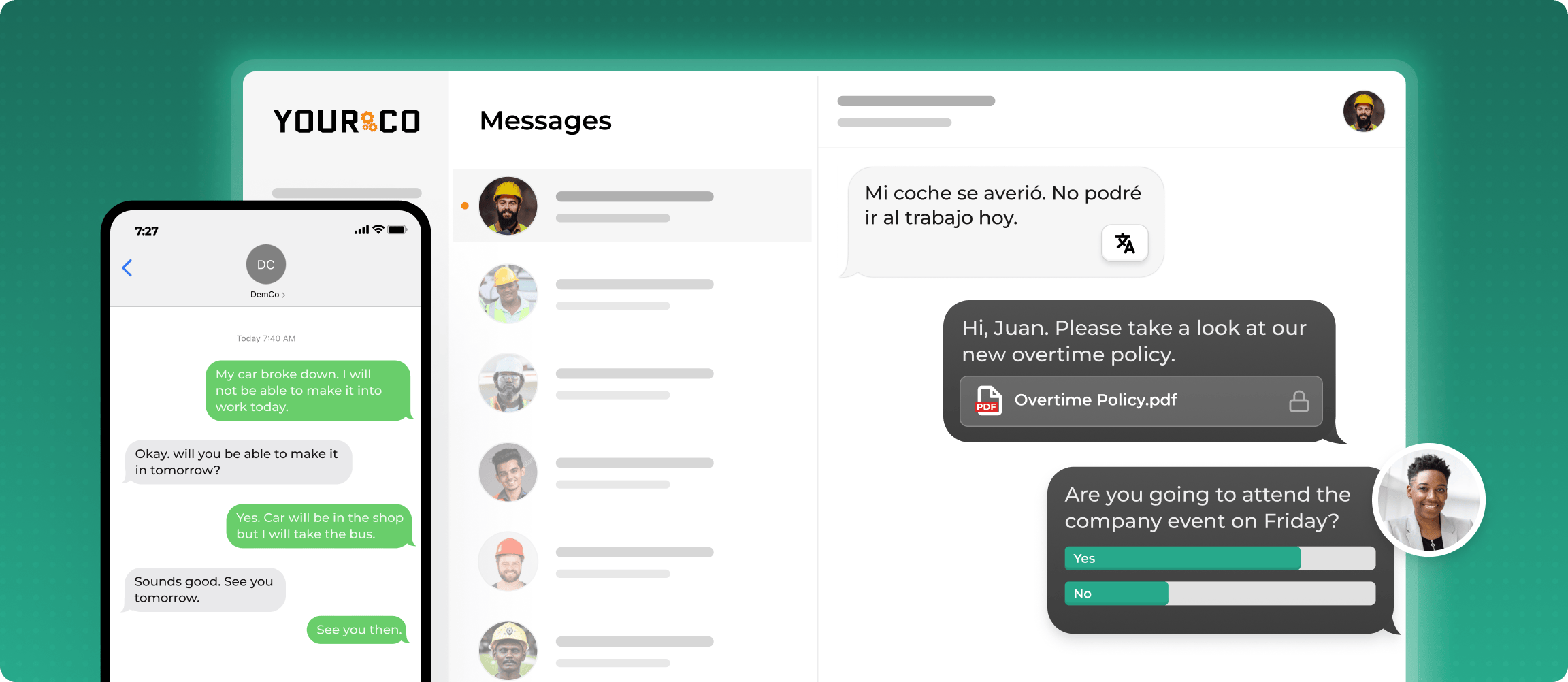
SMS works on any mobile phone with no app download or internet connection. SMS-based platforms like Yourco send alerts from one dashboard and sync contact data through human resources information system (HRIS) and payroll integrations. A one-way broadcast channel lets headquarters push the same directive to every location at once, while site managers keep their own two-way conversations with local crews.
How Do Employers Target Alerts by Building, Site, or Shift?
A chemical spill at one plant should not trigger an evacuation three states away. Recipient groups built in advance by location, department, shift, or role make that possible. Where each building is its own location, safety leaders select the affected groups during an incident instead of scrolling through a master list. The same segments handle partial events, evacuating one building while a neighboring building holds in place, and alerts that go only where they apply protect against alert fatigue.
How Do Employers Confirm Every Employee Is Safe After an Alert?
The Occupational Safety and Health Administration (OSHA) lists procedures to account for all employees after evacuation as part of an emergency action plan in 29 CFR 1910.38. Two-way SMS makes that accounting step workable across sites. Employees reply with a word such as "Received" once they reach the assembly point, and administrators review the delivery log to see who has confirmed. Wardens at that building follow up on the names still missing.
This information is for general awareness only. For specific compliance guidance, consult with qualified legal professionals.
What Role Do Multilingual Alerts and Centralized Archiving Play?
An alert only coordinates multiple sites if every worker understands it. Automatic translation delivers one composed message in each employee's preferred language, so a Spanish-speaking night shift and a Vietnamese-speaking day crew get the same instruction. The system logs every alert and reply with a timestamp in one searchable record, so after a drill, safety leaders review timing, recipients, and confirmations without pulling records site by site.
How Do Employers Send Evacuation Alerts to All Employees Instantly?
The send sequence is the same whether the order covers one building or every site a company operates:
- Segment selection: the pre-built segments for the impacted locations, or the entire workforce if the event is company-wide.
- The evacuation alert: plain-language messaging that states what is happening, which exit or assembly point to use, and what to do next. SMS delivers it to every selected phone at once.
- A confirmation reply: employees text back once they reach the assembly point, which shows who is safe.
- Nonresponder follow-up: the system identifies anyone unaccounted for by name and last known location, and sends that list to the incident response lead.
- The communication record: the archive becomes the raw material for the post-drill critique and the compliance file.
According to a Yourco-commissioned survey of 150 HR leaders, 88% say they need a reliable way to reach frontline employees, but only 55% are confident they have one. Rehearsing this sequence in a drill is what moves a company from the first number to the second.
Why Do Multilingual Emergency Communications Matter Across Every Location?
Fatal injury rates for Hispanic or Latino workers reached 4.3 per 100,000 full-time equivalent workers in 2024, against a national rate of 3.3, according to the Bureau of Labor Statistics. Foreign-born workers accounted for 68.5% of those fatalities. In a multi-site operation, an alert that one plant's crew cannot read is an alert that has failed.
How Should Employers Handle Language Accessibility?
Emergency content works when it arrives in the languages the workforce actually speaks, and some jurisdictions add their own expectations. Many employers post the English version and the translated version together rather than replacing one with the other. Finding effective ways to communicate with non-English-speaking employees supports comprehension and consistency across sites.
How Do Employers Implement Multilingual Alerts Across Every Site?
A needs assessment of the languages employees speak at each location comes first, followed by multilingual alerts, translated documentation, workplace translation tools, and universal safety symbols. Automatic translation keeps sites consistent, so every location receives the same instruction rather than improvising its own version.
How Do Cultural Differences Change Emergency Messages?
Direct translation is not always enough. On construction sites, a literal translation of "stand-down" caused confusion because it implied a work stoppage instead of a safety pause. Testing emergency messages in drills at every site, not just at headquarters, surfaces those misreadings, and the crews receiving them can name what went wrong.
How Should Employers Roll Out the System Across Every Site?
A rollout has four stages: setup and integration, training and adoption, scheduled testing, and continuous review. Each stage fails differently across sites.
How Should Employers Set Up and Integrate the System?
A centralized control system that manages alerts across every site from one dashboard is the foundation. Multi-channel tools layer on top, including mass notification systems (MNS), SMS broadcasts, panic buttons, two-way radios, or wearables. Ruggedized devices and loud alarms matter most in manufacturing or construction, and resilient connectivity matters most for dispersed teams.
How Do Employers Train Employees and Drive Adoption?
The workforce must know how to use the system, just as a workplace safety guide ensures employees understand the underlying protocols. Drills, step-by-step guides, and visual aids let workers grasp procedures at a glance, and multilingual training extends that to every crew.
Effective onboarding puts the system in front of team members from day one, before an incident makes it urgent.
How Often Should Employers Test and Maintain the System?
Consistent scheduling beats occasional intensity: monthly drills, quarterly checks, and annual full reviews. OSHA's employee alarm standard sets annual testing for supervised alarm systems and testing every two months for non-supervised ones.
Employers can layer their own drill procedures on top of that baseline. Software and hardware stay current, and every test and its outcome is documented by location.
This information is for general awareness only. For specific compliance guidance, consult with qualified legal professionals.
How Do Employers Keep Improving Over Time?
Surveys and post-incident reviews surface what the metrics miss. Comparing message delivery rates and alarm response times across locations identifies lagging sites, and reviewing ways to communicate effectively with frontline employees keeps the approach current.
How Do Employers Measure Emergency Communication Effectiveness?
Three measures show whether an emergency system works: delivery rate, how quickly employees acknowledge an alert, and reliability under failure conditions. Each is measured at the site level, not company-wide.
Which Key Performance Indicators Matter Most?
Delivery rate and system uptime are core performance measures, and engagement levels show whether employees respond. A strong company-wide delivery rate can hide a single plant where stale contact data leaves an entire shift unreachable. The bounce percentage from the last send at each site, and the contacts the last HRIS sync added or removed, show where that is happening.
How Quickly Do Employees Acknowledge Alerts?
With SMS-based platforms like Yourco, employees confirm receipt by replying with a word such as "Received." Reply times show where confirmations lag and who remains unconfirmed.
How Reliable Is the System Under Failure Conditions?
System reliability covers channel performance and hardware resiliency. Failure rates and scheduled backup tests are the measures, along with a record of which sites completed the last quarterly test and which did not.
Case Study: Emergency Communication Across 338 Locations
Great Day Improvements (GDI) runs roughly 5,000 frontline employees across 338 locations and 167 markets. Corporate leadership and local HR had no consistent channel to reach frontline teams, leaving communication fragmented and giving corporate no real-time view of on-the-ground safety concerns.
Running Yourco, GDI sends company-wide directives to every location at once, while local HR keeps day-to-day conversations with their own crews. Employees report operational and safety issues directly, and corporate sees that activity across locations in real time. Retention across the organization rose from 87% to 93%.
Strengthen Frontline Safety Communication With Yourco
One alert reaches every site, with no app download and no company email required. Yourco is an SMS-based employee communication platform built for frontline teams.
- Alerts arrive as standard text messages on any mobile phone, including basic flip phones, at no cost to employees
- Two-way messaging lets workers confirm receipt and raise issues with their site managers
- Artificial intelligence (AI) translation delivers the same instructions across 135+ languages and dialects
Yourco's 240+ HRIS and payroll integrations automatically sync contact data, so a new hire at any site is reachable on day one.
Enterprise Bridge gives corporate teams a one-way channel to push the same emergency directive to every location at once, while site-level two-way messaging keeps local crews replying to their own managers.
Frontline Intelligence gives safety and operations leaders centralized visibility into frontline message activity across all locations. It surfaces the safety concerns raised in worker replies and shows activity by location or department, with delivery tracking for post-drill review.
"Yourco has been huge for us, especially during the weather crisis. We were able to keep our employees safe and make sure everyone was notified of updates in a timely manner."
— Scott Pfantz, Operations Manager, Nufarm - Alsip
After 90 days on Yourco, companies see two-way employee engagement reach 86%.
Try Yourco for free today or schedule a demo and see the difference the right workplace communication solution can make in your company.
Frequently Asked Questions About Emergency Communication Systems
What emergency communication system works across multiple locations?
An SMS-based system works best across multiple locations because it sends one alert to every site simultaneously, targets recipients by location, department, shift, or role, collects reply-based safety confirmations, and archives every message centrally. Because texts reach any phone without an app or internet connection, they include every site and crew.
How do I send evacuation alerts to all employees instantly?
Send the evacuation order as a mass text from a centralized dashboard. Select all employees or the affected groups, write plain-language instructions naming the assembly point, and send. The alert lands on every phone at once, and a reply confirms receipt.
How do I send evacuation instructions to employees across multiple buildings?
Segment the workforce by building or site in advance, then select the affected buildings when the emergency happens. Each group receives instructions specific to its own exits and assembly points, while unaffected buildings receive a hold-in-place message. Follow up individually with anyone who has not confirmed.
Do employees need a smartphone or an app to receive emergency alerts?
No, SMS-based platforms like Yourco deliver alerts as standard text messages on any mobile phone, including basic flip phones, with no app download, company email, or Wi-Fi required. Employees pay nothing to receive them, and no setup step stands between a new hire and the first alert.
How do employees confirm they are safe after an evacuation alert?
Employees reply directly to the alert by text, for example with a word such as Received, confirming they have reached the assembly point. Supervisors then see who has responded, identify anyone unaccounted for, and pass those names to the official in charge during the accounting step.
Can systems send emergency alerts in multiple languages at once?
Yes, systems with automatic translation deliver the same alert in each employee's preferred language simultaneously, so multilingual crews receive identical instructions without waiting for manual translation. That consistency matters most during evacuations, when a misunderstood instruction can delay workers reaching safety.