


SHRM's State of the Workplace research found that 56% of HR departments already lack sufficient staff to cover their workload. In manufacturing, logistics, and healthcare, understaffing collides with a document-collection burden that never stops: onboarding paperwork, I-9s, safety certifications, and policy acknowledgments for a workforce that replaces itself faster than the files can keep up with. The spreadsheet you inherited works until it doesn't, usually the week a regulator calls. Meanwhile, every incomplete file is a compliance gap waiting to surface at the worst possible time. You need a system that tracks employee document submissions automatically, reaches workers who never sit at a desk, and gives you audit-ready proof on demand.
TL;DR
- Spreadsheet-based document tracking collapses at scale and creates invisible compliance gaps that surface only during audits
- Automated reminders, audit trails, and status dashboards are non-negotiable features for any document tracking system in frontline industries
- Frontline workers need mobile-first submission options because personal devices are often how they access HR resources, and many don't have company email, laptops, or app access during shifts
- Role-based access and retention automation protect sensitive records and reduce manual oversight
- Dynamic checklists that adjust by role, location, and hire type prevent over-assignment and improve completion rates
- SMS-based platforms like Yourco let frontline workers submit documents and confirm receipt via text on any phone, no app required
Identify Why Spreadsheet Tracking Fails Frontline Teams
The most common document tracking failure pattern starts the same way everywhere. Someone builds a spreadsheet to track who has submitted what. It works briefly. Then hiring picks up, managers forget to update the file, different versions circulate, and HR discovers records are drifting but has no reliable way to see where steps were skipped.
Incomplete employee files can create serious paperwork exposure, and research shows many organizations compound the risk by relying on too many disconnected systems. For frontline industries, this fragmentation creates a specific problem: disconnected portals make document submission harder, so workers often do not complete it. A Yourco-commissioned survey of 150 HR leaders found that 69% say missed or poor communication with frontline workers is a recurring source of frustration, a figure that maps directly onto what happens when document requests never reach the people who need to respond.
Frontline retention is materially harder in the first year than for office roles, meaning HR teams are perpetually processing onboarding paperwork, I-9s, and certifications for a workforce that is constantly replacing itself.
The seven options below cover the full range of how organizations handle document tracking today, from corporate HR teams to distributed frontline operations with no reliable desktop access.
Breaking Down All 7 Document Tracking Systems in Detail
The most effective setups pair a purpose-built frontline communication layer with supporting DMS, e-signature, and automation tools. The stakes are real: the same Yourco-commissioned survey of 150 HR leaders found that 88% believe better communication tools can directly reduce employee churn, which means the system you choose to collect and track documents is also a retention decision. Here is how the leading options break down.
1. Yourco
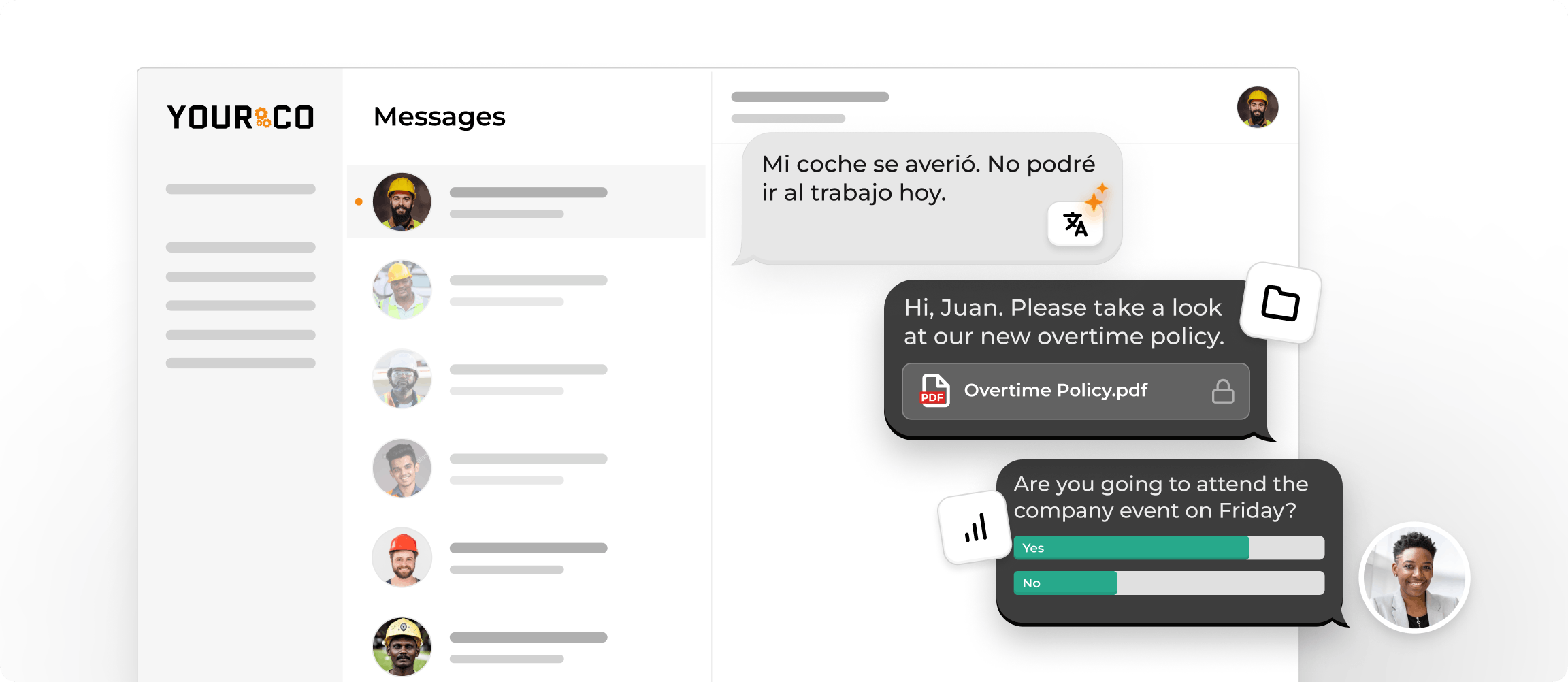
Yourco is the SMS-based employee communication platform purpose-built for frontline teams who cannot be reached through apps, email, or desktop systems. For document submission tracking, Yourco sends automated reminders when certifications are approaching expiration, and workers respond directly from any phone to confirm receipt, submit photo captures of documents, or acknowledge policy updates. Every reply is automatically timestamped and linked to the worker's employee record, creating a compliance-ready audit trail without any manual filing.
No portal login, no app, no cost to employees.
Key features:
- SMS document submission to any phone, including flip phones, with no app or Wi-Fi required
- Automated expiration reminders with two-way confirmation flows for missing documents
- AI-powered translation across 135+ languages and dialects
- 240+ HRIS and payroll system integrations that sync new hires, role changes, and terminations automatically
- Enterprise Bridge for one-way corporate broadcasts of document deadlines and compliance updates across all locations
- Frontline Intelligence surfaces submission completion rates, pending documents, and acknowledgment gaps across every site in a centralized dashboard
Best for: Distributed, multilingual, or device-limited frontline teams where app adoption is a barrier and delivery reliability, compliance documentation, and language access are non-negotiable.
2. Folderit
Folderit is a cloud-based DMS built around folder structures, version control, and configurable retention policies, with audit logging and role-based permissions for teams that need lightweight document management without enterprise overhead.
Key features:
- Hierarchical folder structure with version history and search
- Configurable retention policies and automated archival
- Role-based access controls and activity logs
Best for: Smaller HR teams needing organized cloud document storage with retention automation.
3. PandaDoc
PandaDoc specializes in e-signature workflows and fillable document forms, providing drag-and-drop form creation with a full audit trail on every signature event, including timestamp, IP address, and signer identity.
Key features:
- Drag-and-drop fillable forms and e-signature workflows
- Tamper-evident audit trail on every signature and document access event
- Template library for HR documents, including offer letters, NDAs, and policy acknowledgments
Best for: HR teams that need e-signature compliance and a clean audit trail for signed documents.
4. DynaFile
DynaFile handles the scan-to-digital transition for paper HR files with HR-specific indexing, automated retention schedules, and HRIS integrations.
Key features:
- Scan-to-cloud document conversion with HR-specific file indexing
- Automated retention schedules aligned to employment record requirements
- Integration with common HRIS platforms for employee record linking
Best for: Organizations converting paper HR files to digital records that need HR-specific indexing.
5. Eddy
Eddy ties document storage directly to each employee record, allowing HR managers to assign required documents, track completion, and send reminders on a single platform.
Key features:
- Employee record-linked document storage with completion tracking
- Configurable document requirements by role or hire type
- Built-in reminders for incomplete or expiring documents
Best for: Small to mid-sized teams that want document tracking inside their HRIS without a separate platform.
6. Zapier
Zapier connects your existing HR and DMS tools, triggering automated submission reminders and overdue document alerts without custom development.
Key features:
- 7,000+ app integrations covering HRIS, DMS, and communication tools
- Trigger-based workflows for document expiration, submission deadlines, and status changes
- No-code workflow builder accessible to non-technical HR teams
Best for: HR teams with separate document management and communication tools who need to connect them into automated reminder workflows.
7. Google Workspace
Google Workspace provides shared document storage through Drive with access permissions, version history, and activity logs for teams already in the Google ecosystem.
Key features:
- Drive-based document storage with folder-level and file-level access controls
- Version history and activity logs for shared documents
- Native integration across Gmail, Docs, Sheets, and Forms for lightweight document workflows
Best for: Enterprise teams already on Google infrastructure who need shared cloud storage and access controls.
The right stack pairs Yourco's SMS submission layer with a backend DMS or e-signature tool: Yourco reaches workers, and the DMS organizes their submissions.
Prioritize the Features That Actually Track Employee Document Submissions
Not every document management system is built for frontline realities. Before evaluating vendors, focus on the capabilities that directly solve the tracking problem across shift-based, multi-site operations. Here are the features that matter most:
- Automated expiration reminders: Escalating alert sequences sent before certifications or documents expire, routed to the employee, their manager, and HR
- Audit trails: Tamper-evident logs recording who accessed, modified, or approved each document and when. Many employers rely on these during OSHA, DOL, and I-9 reviews
- Real-time status dashboards: At-a-glance views showing completion rates by employee, team, location, and document type with drill-down capability
- Role-based access controls: Granular permissions ensuring store managers see only their team's documents while regional HR sees the full picture
- Mobile-first upload capability: Smartphone camera capture and direct submission for workers who never touch a desktop
- Retention policy automation: Scheduled archival and disposition by document type aligned to federal and state requirements
Any system missing these core capabilities will leave compliance gaps in a frontline environment. The available research confirms that automated classification helps teams keep up with the volume of documents organizations handle.
Automate Reminder Sequences That Escalate Before Deadlines
Manual follow-ups don't scale across OSHA certifications, CDL renewals, food handler permits, and policy acknowledgments for hundreds of frontline workers.
An effective automated reminder architecture uses a structured escalation cadence:
- Early notice: Employee receives an initial awareness notification
- Manager notice: Employee and direct manager both receive alerts, so the renewal process can begin
- HR notice: Employee, manager, and HR all receive alerts, so renewal is confirmed in progress
- Escalation notice: HR and department leadership receive an alert to verify that the renewal has been submitted
- Urgent notice: All stakeholders receive a final high-priority notification
- Status change: System status changes once the deadline passes
Workers on a factory floor will not check email or an app portal during a shift. SMS reminders reach them regardless of device access or shift timing.
Build Audit-Ready Records and Assign Documents Dynamically
Many employers are asked during OSHA reviews to demonstrate who submitted which document, when it was approved, and who reviewed it. Your document tracking system should automatically generate an immutable record on every submission, approval, and access event. These timestamped logs become your safety records documentation, and exportable reports eliminate the scramble when a regulator requests records on short notice.
Static checklists compound this risk by assigning requirements that don't match each worker's role or jurisdiction. A document tracking system should dynamically generate checklists based on role, location, department, and hire type, and automatically reactivate affected checklists when regulatory requirements change.
Track Every Document Submission Instantly With Yourco
Yourco gives HR and operations teams a direct line to every frontline worker for document submission tracking, reminders, and two-way confirmation through SMS on any phone. Workers snap a photo of a certification and send it via text; they reply to confirm a policy acknowledgment, and that response is automatically timestamped and linked to their employee record. No app download. No portal login. No training required.
Core communication capabilities:
- SMS to any phone works on smartphones and basic flip phones, with no app download or Wi-Fi needed
- Two-way messaging lets workers submit documents, ask questions, and confirm receipt directly via text
- AI-powered translation across 135+ languages and dialects ensures multilingual workers receive document requests and instructions in their preferred language
Yourco integrates with 240+ HRIS and payroll systems, automatically syncing new hires, role changes, terminations, and language preferences so document assignments stay current without manual updates.
Enterprise Bridge enables corporate leadership to send centralized, one-way updates on document deadlines and compliance directives across all locations, while local managers maintain direct, two-way communication with their teams.
Frontline Intelligence gives HR and operations leadership centralized visibility into document submission status across all locations, tracking completion rates by site, flagging the lowest-performing locations, and surfacing submission gaps before they become audit liabilities.
For teams handling new-hire files, I-9 documents, and other onboarding paperwork, these documents can be requested through the same SMS-based workflow, keeping document collection moving even when workers do not have regular access to a computer.
"We have nearly 700 employees and 80% are non-desk based, communication is a challenge. Yourco provides a quick easy way to reach everyone and a secure way for employees to reach HR and leadership without a computer."
— Felisha Parker, VP Human Resources, McCarthy Auto Group
After 90 days on Yourco, companies see two-way employee engagement reach 86%.
Try Yourco for free today, or schedule a demo to see the difference the right workplace communication solution can make for your company.
Frequently Asked Questions about Tracking Employee Document Submissions
What is the best way to track employee document submissions?
The best approach combines automated reminders, real-time status dashboards, and a submission channel workers can actually access. For frontline teams without desktop or email access, SMS-based platforms like Yourco let workers submit documents and confirmations via text on any phone, automatically creating timestamped compliance records.
How do automated document reminders reduce compliance risk?
Automated reminders send escalating notifications before certifications and documents expire, routing alerts to the employee, their manager, and HR on a set cadence. This prevents the common failure in which document gaps are discovered only during audits rather than in normal operations.
What features should an HR document tracking system include?
Essential features include automated expiration reminders, tamper-evident audit trails, real-time status dashboards, mobile-first document upload, retention policy automation, and dynamic checklists that adjust by role and location.
How can frontline workers submit documents without a computer?
Yourco enables SMS-based submission on any phone, including basic devices, with no app or account setup required and no cost to employees.
Why do spreadsheets fail for tracking employee documents?
Spreadsheets rely on manual updates with no version control, automated reminders, or audit trails. As hiring scales, versions diverge, updates get missed, and HR typically discovers gaps only when a regulator requests records.
This information is for general awareness only. For specific compliance guidance, consult with qualified legal professionals.


