The fastest way for a field worker to report a safety incident is to text one dedicated number from where the hazard is, with a photo attached and a timestamp applied on arrival. A technician spots frayed wiring but has no easy way to flag it. A driver watches a forklift nearly clip a pedestrian and says nothing, because finding the right form takes longer than the near miss did.
Paper forms sit in a trailer miles from the job site, apps stall without a signal, and phone calls leave nothing in writing. SMS needs none of that to work.
TL;DR
- Paper, apps, email, and phone calls each fail in the field for a different reason, and delays cost the report.
- One dedicated SMS number, posted where crews work, removes the search for a form.
- A photo plus one sentence is enough to act on, and both automatically carry a timestamp.
- Two-way replies let a supervisor judge severity, ask for detail, and close the loop.
- Routing rules send each report to the right person by site, shift, or severity.
- SMS-based platforms like Yourco capture reports on any phone, translate them, and store every thread as a searchable record.
Understand Why Traditional Incident Reporting Fails Field Workers
Paper, phone calls, and office email each break at a different point once the worker is on a site rather than at a desk. A chemical spill happens during the morning shift, but the report form is in a filing cabinet at the office. By the end of the day, half the detail is gone, weakening the investigation and leaving the hazard in place.
Apps fail on connectivity. Loading a safety app inside a steel warehouse, an underground tunnel, or a rural route means waiting on data coverage that barely reaches a bar, so crews either wait or give up. Downloads, logins, and updates add their own friction.
Email leaves a written record, but most field crews carry no company account, and weak signal chokes photo attachments. Phone calls feel immediate and produce no photo, no timestamp, and nothing searchable when a regulator asks questions months later.
88% of HR leaders say they need a reliable way to reach frontline employees, while only 55% are confident they have one, according to a Yourco-commissioned survey of 150 HR leaders. Reporting runs into the same wall from the other direction.
Then there is what workers learn from the process. Some avoid paperwork because they expect blame. Others dismiss a close call because nobody was hurt, even though close calls often precede injuries.
When a report vanishes into a filing system with no follow-up, workers conclude that documenting a hazard changes nothing, and risk becomes part of the job. Watching how sentiment shifts across a crew is one way to catch that drift early.
Structural costs matter, too. When incident reports reach the corporate office months late, reviews across locations stall, corrective actions slip, and the same hazard repeats at another site before leadership sees the pattern.
Identify What Makes Incident Reporting Effective for Distributed Teams
Effective reporting starts the moment a worker sees the problem, not after the drive back to the yard. Five things separate a channel crews use from one they abandon.
- Reach: a channel that runs on any phone with basic cell service works in steel buildings, underground facilities, and remote locations where data coverage drops out, and text messaging clears that bar where email and apps do not.
- Familiarity: everyone already knows how to text, so no training stands between the hazard and the report.
- Photos: an image of a leaking hose or a cracked scaffold gives the safety team context no form field produces, and it stores alongside the written detail as evidence, with timestamps and sender identity logged automatically on arrival.
- Two-way contact: two-way texting lets supervisors confirm details, request another photo, and tell the worker what happened next, on any phone that can text, from a flip phone to a smartphone.
- Language: crews that include immigrant or contract workers report less when reporting means composing in a second language, and real-time translation raises both the volume and the clarity of what comes in.
Teams working on the bigger picture can start by engaging frontline crews.
Compare Common Incident Reporting Methods for Field Teams
The tool a crew is handed matters as much as the safety rule behind it. Each of the five common methods behaves differently once the worker leaves the office:
91% of HR leaders say SMS increases frontline response rates, according to the same Yourco-commissioned survey, and the low effort is why near-miss reports tend to arrive at all.
What Should You Look for in an Incident Reporting Tool for Frontline Workers?
The short answer is a tool that needs nothing from the worker's phone beyond the ability to text. For a full side-by-side of the options, the round-up of incident reporting tools for frontline crews is the fuller answer, and the criteria below are what to judge them against.
- Works on any phone with cell service, including basic flip phones, with no app download and no login
- Accepts a photo in the same thread as the description
- Timestamps each message on arrival and keeps the thread searchable
- Routes by site, shift, or severity to a named owner
- Translates both directions for multilingual crews
- Produces records that fit existing forms, such as an incident report template or the fields an OSHA incident report expects
App-based tools score well on structured data and badly on the two things that decide whether a report exists: connectivity at the moment of the hazard, and the number of steps between seeing it and sending it. SMS-based reporting inverts that trade-off, which is why it holds up in the field.
Implement SMS-Based Incident Reporting for Field Teams
Start with one dedicated number, so every phone on site becomes a reporting channel. A worker who spots a hazard texts that number instead of hunting for a form or waiting to reach a computer.
Choose a short, memorable number and post it on badges, vehicles, and break-room signage. One entry point keeps reports from scattering across calls, inboxes, and hallway conversations. One text with a photo or a short note is the whole ask.
Build the reply side next. When the first text arrives, a supervisor can ask for a photo, a location, or whether anyone is hurt, which separates a minor spill from an emergency in the first minute. Routing rules then direct each report by site, shift, or severity so nothing sits unclaimed.
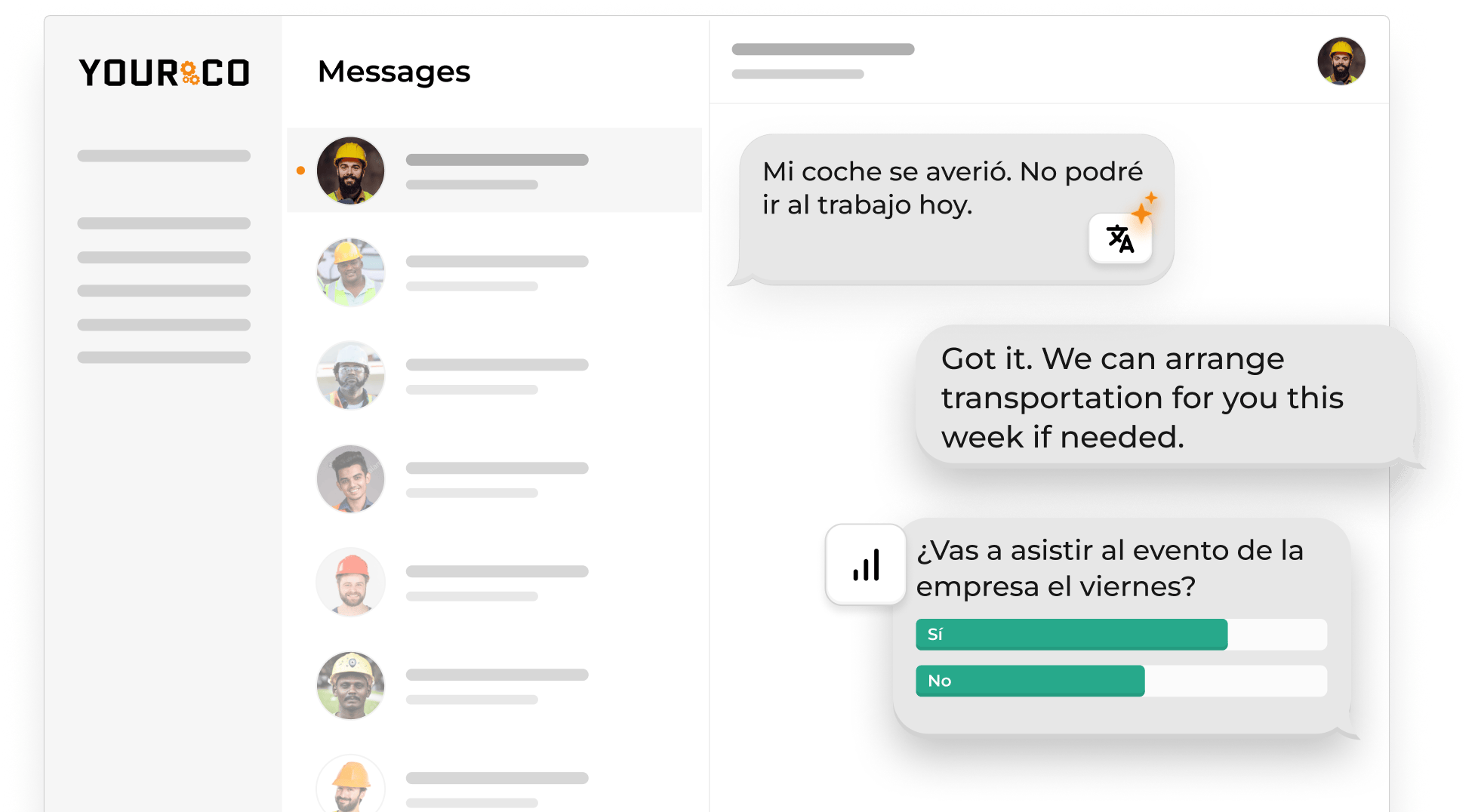
Acknowledge every sender, even briefly: "Got it, maintenance is on the way." That reply sustains frontline engagement next time.
Then read the reports across sites, not only within one. A frayed cable at a single facility is a local repair. The same failure surfacing at five facilities is an enterprise risk, and that difference is usually only visible from the center. AI analytics layers such as Yourco's Frontline Intelligence scan message traffic for high-risk language and group it by location, so corporate EHS leaders can see a pattern forming while it is still cheap to fix. That is the difference between acting on a trend and reacting to an incident report.
Promote the number the way PPE requirements get promoted:
- Review it during toolbox talks
- Print it on equipment checklists
- Name the first few reports that led to a repair
- Refresh the reminder after any site move or crew change
A number nobody remembers is the same as no number at all, so the reminder belongs on the same schedule as the safety talk itself.
Capture Safety Reports Instantly With Yourco
Yourco is an SMS-based employee communication platform that turns a text from the floor into an incident record. A crew member photographs the spill or the broken guardrail, texts the dedicated number, and the message becomes a searchable, timestamped entry with no app, form, or password involved. Core capabilities include:
- SMS to any phone, including basic flip phones, with no app download, no Wi-Fi, and no cost to employees
- Two-way messaging, so supervisors can ask follow-up questions and confirm the fix in the same thread
- AI-powered translation across 135+ languages and dialects, in each worker's preferred language
- Message archiving with timestamps and delivery tracking, plus secure photo sharing through PIN-protected links
Yourco connects to 240+ HRIS and payroll systems, so names, sites, and phone numbers stay current without manual list maintenance.
Enterprise Bridge gives corporate EHS and operations leadership a one-way channel for safety directives across every location, while site supervisors keep their own two-way threads with their crews.
Frontline Intelligence scans everyday messages for high-risk language and gives leadership site-level visibility, so safety leaders can see which locations are raising concerns and where reports are clustering rather than waiting on a monthly roll-up.
"Yourco has been huge for us, especially during the weather crisis. We were able to keep our employees safe and make sure everyone was notified of updates in a timely manner."
— Scott Pfantz, Operations Manager, Nufarm - Alsip
After 90 days on Yourco, companies see two-way employee engagement reach 86%.
Try Yourco for free today or schedule a demo and see the difference the right workplace communication solution can make in your company.
Frequently Asked Questions About Field Worker Incident Reporting
How can field workers report safety incidents without returning to the office?
Workers text a dedicated number from the job site with a short description and a photo, which arrives with a timestamp attached. Because text runs on basic cell service rather than data, reports get through at mines, warehouses, and remote sites where an app would sit waiting for a connection.
What is the best incident reporting tool for frontline workers?
The best tool is the one a crew will use with cold hands and no signal, which in practice means texting rather than an app. Judge candidates on whether they work on any phone without a login, accept photos, timestamp arrivals, route by site, and translate both directions.
What should be included in a field safety incident report?
A workable report states what happened, where, when, and who was involved, with a photo when possible. SMS-based platforms like Yourco collect those fields in one short exchange, and a supervisor can request anything missing in the same thread rather than sending the worker back to a blank form.
How do you document safety incidents for compliance?
Use a channel that logs every message with a timestamp and sender identity, then stores the thread where it can be searched. That removes the retyping step between a field note and a safety file, and it keeps messages, photos, and replies together when an investigation needs to reconstruct the sequence.
Why does two-way communication matter for incident reporting?
A one-way alert pushes information out and confirms nothing. Two-way texting lets a supervisor verify details, request another photo, assess severity, and dispatch help within minutes, and it shows the worker the report reached someone. That feedback helps prevent the next hazard from going unreported.
Can multilingual field crews report safety incidents effectively?
Yes, on a channel that translates in both directions. Workers text in their preferred language, supervisors read in theirs, and the reply returns translated. A bilingual safety officer should still check equipment names and control instructions, since a translation error in a machine name can send the wrong crew to the wrong place.