How to Reach Every Employee With 6 Survey Distribution Methods


Effective survey distribution determines whether your questionnaire reaches everyone who matters. For workplaces with teams spread across shifts, locations, and job sites, getting responses from frontline workers can be a challenge. Many lack company email accounts, regular computer access, or time during their workday to check digital platforms. Yet their feedback is just as valuable as any office worker's input.
The way you deliver a survey shapes who responds, when they respond, and ultimately how useful your data becomes. This article explores why survey distribution matters, compares six common delivery methods, and shows you how to reach every employee with questionnaires that drive real engagement and actionable insights.
Why Survey Distribution Determines Success
Survey distribution isn't just about sending questions. How you deliver a questionnaire directly impacts three critical outcomes: participation rates, data quality, and employee trust.
Surveys that only reach employees with company email create an incomplete picture of your workforce. If desk employees receive surveys hours or days before frontline workers, those late recipients feel like an afterthought. Clunky or difficult-to-access platforms reduce completion rates, especially among employees without regular computer access.
Frontline employees often experience survey fatigue when distribution methods create friction. When bombarded with frequent or lengthy surveys delivered through inconvenient channels, they disengage. This problem intensifies when employees see no follow-up or action from previous surveys, making future participation feel pointless. Smart distribution reduces these barriers by meeting employees where they already are and respecting their time constraints.
Create Surveys Worth Distributing
Before selecting a distribution method, ensure your survey merits employees' time. Poor survey design undermines even the best distribution strategy.
Keep surveys focused with clear objectives about what you're measuring: employee satisfaction, engagement, specific operational issues, or safety concerns. Use closed-ended questions with rating scales for most items, as they're quick to answer and easy to analyze. Add one or two optional open-ended questions for deeper context without overwhelming respondents.
Target completion times under 10 minutes for comprehensive surveys. Shorter pulse surveys with 3-5 questions conducted regularly yield better participation than annual questionnaires. For frontline workers with limited time, even 5 minutes may be too long during a shift.
Use established platforms like SurveyMonkey or Google Forms to build your questionnaire. These tools handle question logic, response collection, and basic analysis. Your distribution method (covered throughout this article) determines how you deliver the survey link to employees.
For detailed guidance on crafting effective questions and survey structure, see our complete guide on creating employee surveys or explore proven survey templates you can adapt for your organization.
Understand Frontline Worker Survey Challenges
Frontline workers face distinct obstacles when it comes to feedback collection that office-based distribution methods don't address.
Many non-desk employees don't have company email accounts or regular access to intranet systems. Those who do have email accounts rarely check them during work hours because their jobs keep them on factory floors, job sites, or delivery routes. Limited personal data plans create additional hurdles when employers expect workers to use personal devices to access company surveys.
Shift schedules compound these challenges. Night shift workers often receive company communications during off hours because leadership operates on day schedules. A survey sent at 2PM arrives when third shift employees are sleeping or managing personal responsibilities. This timing mismatch reduces participation and creates inequity between shift groups.
Physical workplace realities also matter. Workers operating machinery, driving vehicles, or handling materials can't safely stop mid-task to complete a survey. Distribution methods that don't account for when workers have safe, available time to respond will fail regardless of how well the survey is designed.
What Are the 6 Core Survey Distribution Methods?
Six primary methods exist for distributing workplace surveys. Each has specific strengths and limitations that make it more or less suitable depending on your workforce composition and operational context.
1. Email Distribution
Email enables you to reach large numbers of employees simultaneously at minimal cost using infrastructure most organizations already have in place.
When to use email:
- Your workforce is primarily desk-based with universal email access
- Employees regularly check company email during work hours
- You're distributing comprehensive surveys with supporting documentation
- You need to track individual responses for follow-up
When to avoid email:
- Your workforce includes significant numbers of non-desk employees
- Workers lack company email accounts or check them infrequently
- Time-sensitive feedback is needed (email's 20% open rate creates delays)
Tactical execution tips:
- Send surveys mid-morning (9-11AM) on Tuesday through Thursday for highest open rates
- Use clear, specific subject lines that explain the survey's purpose and time commitment
- Include the first question in the email body to reduce clicks required
- Send one reminder to non-responders after 48 hours, never more
Email heavily favors desk employees. Only about 20% of work emails get opened, and many non-desk workers lack company accounts entirely. Even employees with personal email addresses have limited time to check it during work hours. Email inboxes receive hundreds of messages daily, burying survey invitations under routine communications.
2. Text Message Distribution
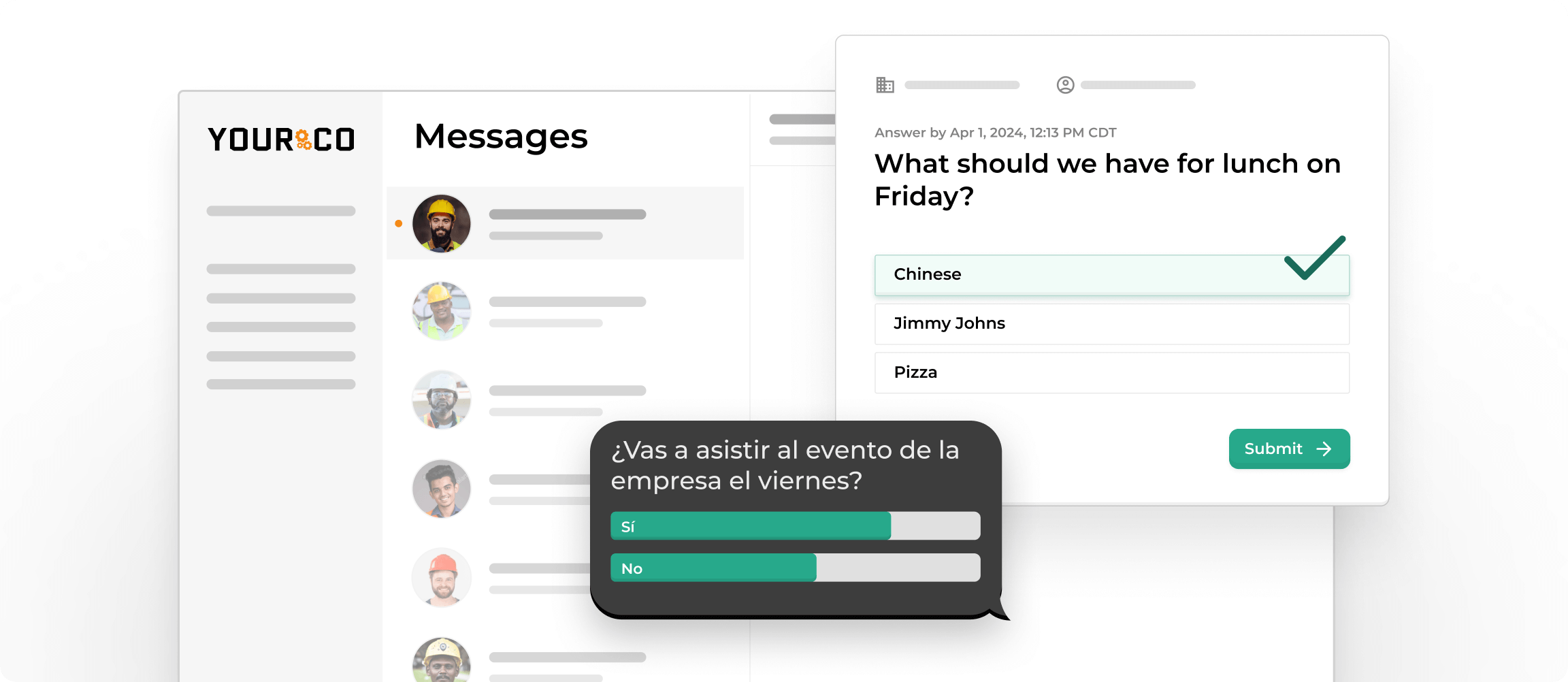
Text messaging delivers survey links directly to employees' mobile phones through SMS, reaching workers regardless of their access to computers or company systems.
When to use SMS:
- Any workforce with frontline, distributed, or shift-based employees
- You need high visibility and fast response times
- Employees work in areas without reliable internet connectivity
- Workers use basic phones that can't run apps
- You're conducting quick pulse surveys with 3-5 questions
When to avoid SMS:
- Never avoid SMS for frontline workforces (because all of them are already using text messaging)
- Long narrative responses are needed (though SMS can link to external survey tools for these)
Tactical execution tips:
- Schedule messages by shift: send to day shift at 7:15 AM, evening shift at 3:15 PM, night shift at 11:15 PM
- Keep the initial message under 160 characters with a clear call to action
- Use mobile-optimized survey links that load quickly on any device
- Allow 24-48 hours for completion, accommodating different schedules
- Send automated reminders only to non-responders to avoid annoying those who completed
Text messaging is widely recognized for high visibility, with many industry sources noting significantly higher open rates compared to email. SMS also works on any phone including basic devices, does not require internet, and reaches employees regardless of shift schedule or location. Research from firms such as Mobile Squared indicates that text messages are often read within minutes, making SMS one of the fastest ways to collect time-sensitive feedback.
SMS is ideal for multiple-choice responses, rating scales, or linking employees to a short external survey. While it is not suited for long, open-ended input, it works extremely well for concise feedback or quick check-ins.
For important company announcements that require action, it also helps to reinforce the message in person during daily or weekly team meetings. A quick follow-up from supervisors ensures everyone understands what is needed and gives employees a chance to ask questions face to face.
3. Physical Paper Surveys
Handing out paper surveys ensures you know who received one and doesn't require any digital access, making it useful in specific scenarios.
When to use paper:
- Small teams in single locations with minimal computer access
- Required by union agreements or specific regulations
- Backup method for employees without mobile phones
- Situations requiring physical signatures or documentation
When to avoid paper:
- You need quick results or trend analysis over time
- You have large workforces across multiple locations
- Data entry resources are limited
- Environmental or cost concerns matter
Tactical execution tips:
- Distribute during mandatory meetings where everyone is present
- Provide pens and a private collection box in the same room
- Set a same-day completion deadline while you have everyone together
- Plan for 2-3 hours of data entry time per 100 responses
Physical surveys create manual work at every step. You must print, distribute, collect, and manually enter data from each response. Multiple steps introduce opportunities for submissions to be lost or misplaced. Data entry is time-consuming and error-prone. Storage and organization of physical forms adds complexity.
4. QR Code Distribution
QR codes combine in-person distribution with digital convenience, letting employees scan codes with their phone cameras to access surveys instantly.
When to use QR codes:
- Mixed workforces where you can post codes in central gathering areas
- Supplementing other methods to provide additional access points
- Events or meetings where everyone is physically present
- Break rooms or time clock areas with high foot traffic
When to avoid QR codes:
- As your primary distribution method (research shows they don't significantly improve response rates)
- Security-sensitive environments where tampering is a concern
- When employees lack smartphones or have older phones without QR scanning
Tactical execution tips:
- Post codes at eye level in well-lit, high-traffic areas
- Include brief text explaining the survey's purpose and time commitment
- Pair QR codes with SMS distribution for maximum reach
- Rotate codes weekly to track which locations generate responses
QR codes don't require email addresses or app downloads and work with any smartphone. However, they still require physical distribution for non-desk workers and someone must post codes in break rooms or hand them to employees. Not all employees carry smartphones, and some older phones don't support QR scanning.
5. Collaboration Platform Integration
Platforms like Microsoft Teams, Slack, or Google Chat can distribute survey links directly within workplace communication channels.
When to use collaboration platforms:
- Teams already active daily on these platforms
- Fully desk-based workforces with universal platform access
- Quick pulse checks during team conversations
- Supplemental distribution to tech-savvy employees
When to avoid collaboration platforms:
- Surveying non-desk workers without platform access
- Employees lack unlimited data plans for mobile platform use
- Workers don't have time during shifts to check chat messages
- Your goal is reaching everyone equitably (not just the digitally connected)
Tactical execution tips:
- Post survey links in team-specific channels rather than company-wide channels to reduce noise
- Use @mentions sparingly and only for truly urgent surveys
- Pin survey messages to channel tops so they don't get buried in conversations
- Combine with other methods to reach employees who don't actively use the platform
Chat platforms cut through some email noise because they're designed for active communication rather than passive information storage. However, collaboration platforms suffer from similar access limitations as email. Frontline workers typically don't have access to Teams or Slack, may lack unlimited data plans to support mobile access, and don't have time during their workday to check chat messages.
6. Website, Intranet and Social Media Distribution
Embedding survey links on company websites, intranets, or promoting them through social media channels provides additional touchpoints for engaged employees.
When to use website/social:
- Supplemental distribution to tech-savvy, engaged employees
- You're gathering feedback from customers or external stakeholders in addition to employees
- Your workforce regularly visits company intranet or website
- You want to capture voluntary participation from interested parties
When to avoid website/social:
- As primary method for any workforce with significant non-desk populations
- Employees rarely browse company websites during work hours
- Privacy concerns exist with social media mixing work and personal life
- You need to ensure specific people receive and complete the survey
Tactical execution tips:
- Create a prominent banner on intranet homepage with survey deadline countdown
- Use internal social networks (like Workplace or Yammer) rather than public social media
- Post updates about response progress to create momentum
- Always pair website distribution with direct methods (email or SMS) to ensure reach
For frontline workers, these channels are ineffective. Non-desk employees rarely browse company websites during work hours and often maintain separation between personal social media and work matters. Social media promotion also raises privacy concerns and may reach unintended audiences outside your organization.
Why Text-Based Distribution Outperforms Traditional Methods
Most workplace surveys fail because they rely on channels employees rarely check during work hours. Email gets buried, long forms feel overwhelming, and many workers simply don't have the time or tools to complete a survey once their shift starts.
Text messages meet people where they already are. A short message shows up instantly on any phone, requires no app or login, and benefits from exceptionally high visibility. When surveys arrive by text, several advantages emerge that traditional methods can't match.
Universal Access Across All Employee Types
Text messaging is the only distribution method that reaches every employee type equally. Office workers, field technicians, warehouse staff, drivers, and maintenance crews all carry phones. Unlike email or collaboration platforms, phones don't require company-provided devices or special access permissions. This creates true equity in survey access.
Immediate Delivery and High Read Rates
The 98% read rate for text messages means your survey actually gets seen, which is the first requirement for any response. The 90-second average response time indicates employees read texts almost immediately, creating opportunities for time-sensitive feedback collection that email can't provide.
No Technology Barriers
Employees don't need smartphones, internet access, data plans, or app downloads. Text messages work on any mobile device, including basic flip phones. This removes the single biggest barrier preventing frontline worker participation in traditional digital surveys.
Individual Privacy Without Group Chaos
When you text hundreds of employees, each person receives an individual message thread. Unlike group chats that flood everyone's phone with notifications every time someone responds, text-based distribution maintains privacy and avoids notification overload. Employees can respond on their own schedule without seeing others' answers or being disturbed by ongoing group activity.
Combine Methods Strategically for Maximum Reach
While SMS provides the most reliable reach for frontline teams, combining methods thoughtfully can improve participation across diverse workforce segments.
For Mixed Desk and Non-Desk Workforces
Use SMS as your primary channel for all employees, then supplement with email for office-based workers who prefer desktop completion. This approach ensures frontline workers receive surveys through accessible channels while giving desk employees familiar options. Always send SMS first, as it reaches everyone and doesn't depend on office schedules.
For Geographically Dispersed Teams
Combine SMS for immediate reach across all locations with posted QR codes in break rooms at each site. This dual approach accommodates workers who prefer scanning codes while ensuring those who don't visit break rooms regularly still receive direct notification. SMS remains the primary method, with QR codes serving as visible reminders.
For Time-Sensitive Surveys
When you need rapid responses, use SMS exclusively. Adding other methods only delays response collection and complicates tracking. The 90-second average SMS response time means you can gather critical feedback and act within hours rather than days.
For Comprehensive Annual Surveys
For longer surveys that take 10-15 minutes to complete, send an initial SMS with a clear time estimate and a mobile-optimized link. Follow up three days later via email for desk workers who prefer larger screens for lengthy questionnaires. This sequence ensures everyone gets a notification through SMS while providing desktop alternatives for extended survey sessions.
Implementation Best Practices
When combining distribution methods:
- Lead with SMS: Make text messaging your primary channel, not a secondary option
- Stagger timing: Send SMS first, wait 48 hours, then send email follow-up to non-responders only
- Maintain consistent messaging: Use identical wording across channels so employees recognize it's the same survey
- Track by method: Monitor which channels generate responses to optimize future distribution
Avoid duplication: Clearly communicate that employees only need to respond once, regardless of how many channels they see the survey through
Execute Effective Distribution: Timing and Segmentation
Even perfectly designed surveys distributed through ideal channels fail without attention to timing and audience segmentation.
Align Survey Timing With Shift Schedules
Send surveys when employees are working, not sleeping. For 24/7 operations, this requires scheduled delivery by shift. Third shift workers should receive surveys at 11PM when they start work, not at 9AM when day shift leadership is working. This simple timing adjustment can double participation rates among overnight workers.
Platforms like Yourco enable scheduled delivery so third shift workers receive surveys when they clock in at 11PM, day shift at 7AM, and evening shift at 3PM. This ensures everyone receives surveys during work hours when they're expected to engage with company communications.
Allow Sufficient Completion Windows
Balance urgency with fairness. Giving employees 24-48 hours to respond accommodates different schedules and work intensity. Surveys that close after 4 hours favor employees working when it's sent and exclude those on different shifts or handling unexpected work demands.
For quick pulse surveys (1-2 questions), 24 hours suffices. For comprehensive surveys (10+ questions), allow 48-72 hours. Always close surveys at the same time of day you opened them to give all shifts equal opportunity.
Segment Audiences for Relevant Questions
Generic company-wide surveys often ask irrelevant questions to half the recipients. Segmentation ensures warehouse workers see questions about equipment and safety, while retail staff answer questions about customer interactions. This personalization increases relevance and reduces completion time by eliminating inapplicable questions.
Create employee groups based on:
- Location or site: Target site-specific issues without bothering other facilities
- Department or function: Ask operations teams about process improvements, HR questions for managers
- Shift: Night shift questions about lighting and break room access won't matter to day shift
- Tenure: Ask new hires about onboarding, veterans about career development
Platforms like Yourco allow you to create unlimited groups and target surveys precisely, ensuring every question reaches the right audience.
Automate Reminders Without Annoying Recipients
Single automated reminders to non-responders after 24 hours increase completion rates without creating survey fatigue. Multiple reminders or reminders sent to employees who already completed the survey damage goodwill.
Never manually track who has responded. Use platforms that automatically track completion and send reminders only to those who haven't participated. This precision prevents the common mistake of thanking people for completing surveys they haven't seen yet or nagging people who already responded.
Consider Survey Frequency Carefully
Quarterly pulse surveys work better than annual comprehensive surveys for most topics. However, surveying the same population more than monthly creates fatigue. Rotate topics or segments rather than asking everyone about everything constantly.
Use this frequency guide:
- Weekly: Single-question pulse checks on time-sensitive topics
- Monthly: 3-5 question department or location-specific surveys
- Quarterly: 5-10 question engagement or satisfaction surveys
- Annually: Comprehensive 15-20 question organizational surveys
Balance your need for data with employees' patience for surveys. When response rates drop below 40%, you're surveying too frequently or not demonstrating enough action on previous feedback.
Turn Distribution Success Into Actionable Results
Distribution doesn't end when responses arrive. The follow-up process determines whether employees trust future survey initiatives.
Acknowledge Participation Quickly
Send a brief thank-you within 24-48 hours after survey close. SMS works best for this acknowledgment, reaching everyone who participated regardless of their access to other communication channels. Keep the message short: "Thanks for completing our survey. We're reviewing your feedback and will share results within two weeks."
This quick acknowledgment builds trust and sets expectations for when employees will hear more. It also signals that their participation mattered enough to deserve immediate recognition.
Share Results Transparently
Within 2-4 weeks of survey close, share high-level findings with all employees—not just leadership. Use the same distribution method (SMS) to send result summaries, making information accessible to everyone who participated. Focus on three key themes, acknowledge both positive and concerning patterns, and outline specific actions you're taking based on feedback.
Never share survey results exclusively through channels that miss frontline workers. Posting results only on company intranets or in email means the employees who participated via SMS never learn how their feedback shaped decisions.
Close the Loop on Actions Taken
Tell employees specifically what you're changing based on their feedback. Even if you can't address every concern, explain what you can do, what you can't do (and why), and when employees should expect to see changes. This specificity builds credibility and encourages future participation.
Send action updates at 30, 60, and 90 days using SMS: "You said equipment was often unavailable. We've added two backup units at each site and adjusted the maintenance schedule. Let us know if you're seeing improvement."
For detailed guidance on analyzing feedback and implementing changes, see our complete guide on how to take action on employee survey results and explore effective follow-up questions that dig deeper into key themes.
How Yourco Delivers Survey Results: A Real-World Example
This scenario illustrates how text-based distribution solves problems traditional methods create.
Allison is CEO of a manufacturing company with 200+ employees across three shifts at two plants. Most employees work the production floor with no email access. She wants to measure how informed employees feel about company developments.
Step 1: Design Questions and Select Tools
Allison uses Yourco's built-in polling for three quick rating questions about communication effectiveness. For deeper engagement topics, she creates a comprehensive survey in SurveyMonkey with 15 targeted questions about workplace experience, then generates a mobile-optimized link.
Step 2: Schedule Shift-Based Distribution
Rather than sending one message when she's working, Allison creates three employee groups (day shift, evening shift, night shift) in Yourco. She schedules the survey to send 15 minutes after each shift's start time: 7:15AM for day shift, 3:15PM for evening shift, and 11:15PM for night shift.
Shift managers receive advance notice to give employees 15 minutes to complete surveys on their phones before starting regular duties. This ensures everyone receives the survey during paid work time when they're expected to engage.
Step 3: Monitor Real-Time Participation
Yourco's dashboard shows Allison that day shift participation reaches 87% within two hours, evening shift hits 82%, and night shift achieves 79% by morning. Total participation reaches 83%, dramatically higher than her previous 34% rate with emailed surveys that primarily reached office staff.
Step 4: Communicate Results Quickly
Within one week, Allison uses Yourco to text a summary to all employees showing key findings and an action plan addressing three priority areas: clearer policy communication, better safety equipment at Plant 2, and more recognition programs. She schedules shift-specific discussions for the following week to gather additional input on proposed solutions.
Step 5: Demonstrate Follow-Through
Over the next month, Allison sends text updates as each action item gets completed: new safety equipment arrives at Plant 2, policy summaries now go via text in addition to bulletin boards, and a monthly recognition program launches. By closing the loop, she builds trust for future surveys.
This example demonstrates how tactical distribution—choosing SMS, scheduling by shift, monitoring in real-time, and following up consistently—transforms survey success.
Make Survey Distribution Effortless With Yourco
Getting complete survey feedback from every shift and location doesn't require complex coordination or multiple tools. Yourco's SMS-based platform meets employees on devices they already carry, delivering surveys when workers are actually on shift, in languages they prefer.
Yourco's platform removes distribution barriers through:
- Shift-based scheduling that aligns survey delivery with when each crew is working
- Built-in polling for quick pulse checks without external survey tools
- Third-party survey integration with SurveyMonkey, Google Forms, and other platforms
- Automated follow-ups sent only to non-responders, protecting those who already completed
- Segmentation tools that target specific locations, departments, shifts, or roles
- Automatic translation into 135+ languages and dialects so every worker receives surveys in the language they're most comfortable using
Built with enterprise-grade security and integration with 240+ HRIS systems, Yourco provides the reliability and compliance features HR teams need. As results come in, Yourco's analytics highlight patterns and trends by segment, helping leaders understand feedback faster and act on it with confidence.
Ready to get better survey responses from your frontline teams? Try Yourco for free today or schedule a demo to see how the right distribution method transforms survey participation.
Frequently Asked Questions
What are the most effective survey distribution methods?
Text messaging generates the highest response rates (98% open rates vs. 20% for email) because it reaches employees regardless of whether they have company email or computer access. Email, paper forms, QR codes, collaboration platforms, and website integration are alternatives, but for workforces with frontline employees, SMS-based distribution consistently outperforms all other methods in both reach and engagement.
How do you distribute surveys to employees without email or computer access?
Send survey links via text message, which works on any mobile device including basic flip phones. SMS platforms like Yourco deliver surveys directly to employees' phones without requiring internet access, app downloads, or company email accounts. This ensures frontline workers in manufacturing, construction, retail, and logistics receive surveys with the same immediacy as office staff.
How long should an employee survey take to complete?
Aim for completion times under 10 minutes for comprehensive surveys. Shorter pulse surveys with 3-5 questions work better for frequent feedback collection and typically take 2-3 minutes. For frontline workers with limited time during shifts, quick polls delivered via text with single questions often generate the highest response rates because they respect tight time constraints and can be completed during brief breaks.
How often should you survey employees?
Quarterly pulse surveys work better than annual comprehensive surveys for maintaining ongoing feedback without creating survey fatigue. Avoid surveying the same population more than once monthly on any single topic. Instead, rotate survey topics or segment your workforce so different groups receive surveys at different times, balancing your need for data with employees' patience. Weekly single-question pulse checks work well for time-sensitive operational feedback.
When is the best time to send employee surveys?
Send surveys when employees are working, not during personal time. For shift workers, schedule delivery 15-30 minutes after shift start when employees have clocked in but before production demands intensify. Day shift surveys should arrive between 7-9AM, evening shift around 3-4PM, and night shift at 11PM-midnight. Avoid sending surveys during known busy periods like lunch rushes, end-of-month deadlines, or peak production windows. Tuesday through Thursday typically generate better response rates than Mondays or Fridays.
When to Use an Anonymous Employee Survey and Why?
Use anonymous surveys when asking about sensitive topics such as leadership behavior, safety concerns, or workplace conflict, because anonymity helps employees feel safer sharing honest feedback. They work best when trust is still developing or when you want to understand overall culture and patterns across locations rather than individual issues. The tradeoff is that you cannot follow up with specific respondents, so keep questions focused on themes, share results openly, and explain how the feedback will guide next steps.