U.S. workplace injury and illness surveillance still suffers from chronic underreporting, according to a 2025 review in the American Journal of Public Health, and incidents on a floor or jobsite often never make it into the safety log. The best incident reporting tool for frontline workers depends on how employees report incidents and what happens after they submit a report. Some platforms focus on OSHA recordkeeping and investigations, while others prioritize mobile inspections, offline reporting, or easier ways for frontline employees to report incidents and near misses. This guide compares seven options across reporting access, OSHA workflows, mobile capture, multilingual support, and documentation.
TL;DR
- Six of the seven tools require an app, an account login, or both before a worker can file a report
- Intelex and VelocityEHS pre-populate OSHA 300/300A/301 forms and connect to direct ITA e-submission, built for enterprise compliance teams
- SiteDocs and Safesite target construction job sites specifically, with SiteDocs adding signed records and Safesite offering a free starting tier
- SafetyCulture (Mitti) is built around inspections and audits first, with incident capture as a secondary use
- None of the six app-based tools has a documented SMS reporting path for workers without a company smartphone or data plan
- SMS-based platforms like Yourco close that gap: any worker can report an incident by text the moment it happens, no app, login, or Wi-Fi required
What to Look for in a Frontline Incident Reporting Tool
A useful evaluation considers both the safety manager reviewing the data and the worker filing the report. These six criteria separate immediate frontline capture from structured workflows.
- Friction at the moment of report: added taps and fields, including logins, can make reporting less convenient.
- OSHA recordkeeping automation: whether the platform populates required logs, tracks OSHA hospitalization reporting timelines, or requires retyping.
- Mobile capture quality: native photo attachment and geotagging. Check whether reports queue offline.
- Access without hardware requirements: support for flip phones, dead zones, or workers without company smartphones.
- Anonymous and multilingual reporting: workers may underreport for fear of retaliation or because of language barriers.
- Audit trail: timestamped, unalterable incident-log documentation that teams can export.
88% of HR leaders say they need a reliable way to reach frontline employees, while only 55% are confident they have one, according to a Yourco-commissioned survey of 150 HR leaders. That reach problem sits underneath every criterion above: a tool a worker cannot open on the first try becomes a tool nobody uses to report.
Frontline Incident Reporting Tools at a Glance
The table below lines up all seven tools on the criteria above, so you can see where each one wins and where it falls short before reading the full profiles.
1. Yourco: Best for Frontline Incident Reporting
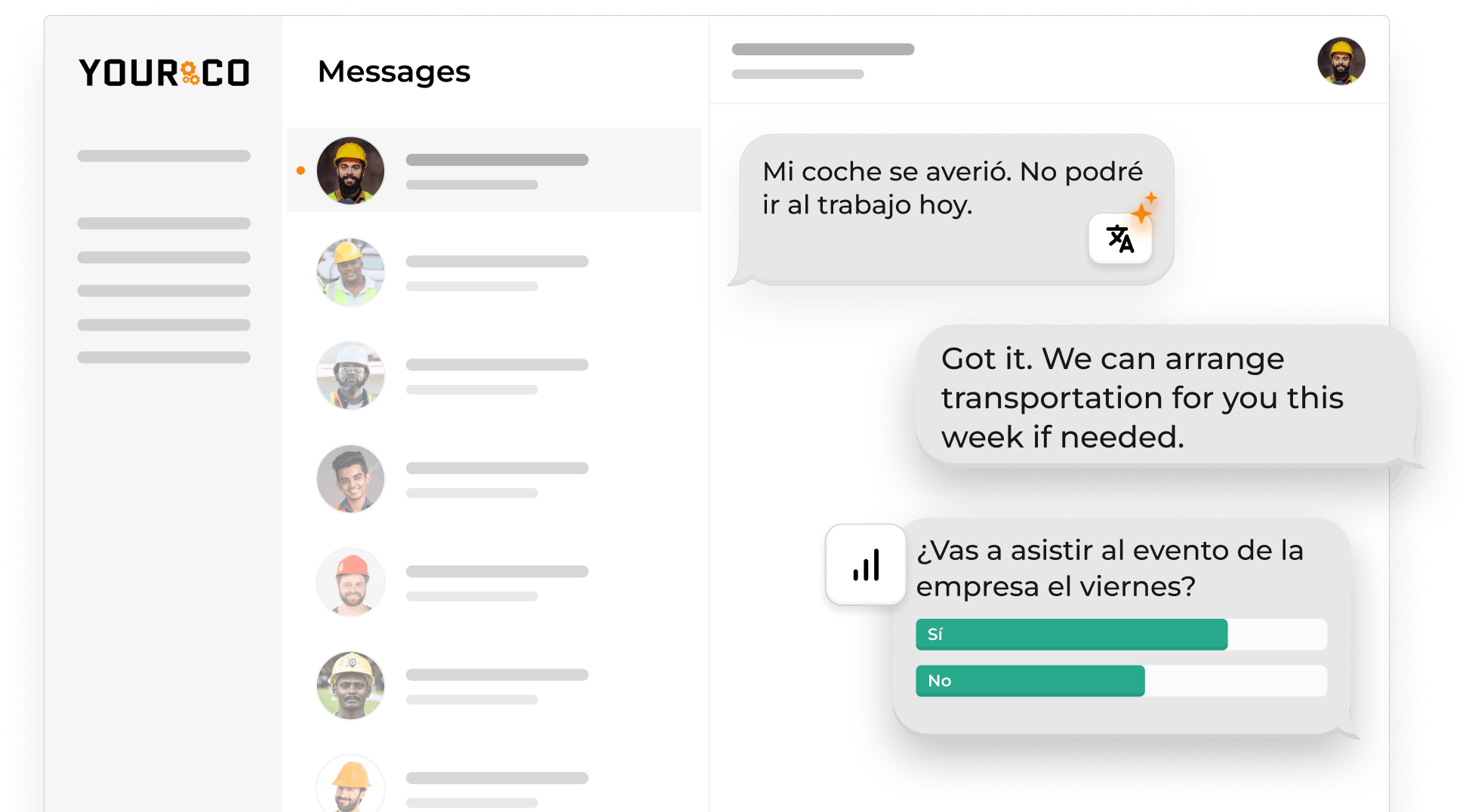
Most incident reporting tools assume workers already have a company smartphone, an app, and a login. That assumption is where reports get lost: a worker who has to find a device or remember a password often just doesn't file the report. Yourco gives frontline employees a simple way to report incidents and near misses through the communication channel they already use: SMS. Workers can text a description or photo without downloading an app, remembering a login, or using company email. Yourco captures the interaction, so safety teams can follow up and maintain a record of the conversation. Yourco complements, rather than replaces, the dedicated OSHA recordkeeping and investigation systems organizations may already use.
That design supports manufacturing floors, construction sites, warehouses, and field crews where workers may not stop to authenticate into an app. A worker can flag a near miss the same way, before it becomes an incident, and AI translation across 135+ languages and dialects lets a supervisor and a worker each read the exchange in their own language.
Key features:
- SMS incident reports with no app, login, or Wi-Fi
- Photo and near-miss capture by text
- Works on any mobile device, including flip phones, at zero employee cost
- Two-way SMS follow-up with message archiving and audit trails
- AI translation across 135+ languages and dialects
- 240+ HRIS and payroll integrations via open API
- Frontline Intelligence analyzes incident and near-miss report patterns across locations
- Free, Pro, Enterprise, and Enterprise Bridge plans with unlimited employee contacts
2. SafetyCulture (Mitti, formerly iAuditor): Best for Formal Inspections and Audits
SafetyCulture uses templates for field inspections with mobile media and location context. Workers can also submit issues through QR codes, which may reduce account friction, while the documented OSHA approach remains template-oriented.
Key features:
- Offline mobile inspections include media and location context; issue reports can come through QR codes
- OSHA support uses templates, and no documented path exists for SMS reporting
3. Intelex: Best for Enterprise OSHA Recordkeeping and Investigations
OSHA reporting, investigations, recordability decisions, and ITA-oriented processes are central to Intelex. Documented mobile tools within its authenticated enterprise environment handle field input and offline work.
Key features:
- OSHA reporting includes ITA-oriented workflows
- Investigation processes include root-cause work
- Media, voice, location, and offline support are available for field capture
- Workers authenticate through an app or browser
4. VelocityEHS: Best for OSHA Automation With Broader EHS Capabilities
Incident management and OSHA workflows are part of a broader VelocityEHS suite. It includes chemical management and ergonomics. The suite also includes industrial hygiene tools, and a documented browser-based QR path can reduce login barriers.
Key features:
- ITA-related workflows connect to OSHA forms, and QR codes support mobile reporting
- Teams have photo capture and offline work; SMS has no documented path
5. SiteDocs: Best for Construction Jobsite Documentation
Construction-focused SiteDocs workflows bring incident forms together with offline work, field photos, and signed records. OSHA support appears across several documented product features.
Key features:
- Construction teams can work offline
- Field media accompanies signed records
- The app includes incident and near-miss forms
- QR codes provide controlled access
6. Safesite: Best Free Starting Point for Small Construction Teams
Mobile incident and hazard reporting is central to Safesite's app-centered workflow. The app supports offline field use and multiple interface languages, while paid plans add reporting and OSHA log functionality.
Key features:
- Teams can start with the free mobile option; Premium plans add OSHA recordable incident logs
- Offline use and multiple languages are available, but no documented SMS reporting path exists
7. Gensuite (Benchmark Gensuite): Best for Enterprise Audits and Contractor Management
Benchmark Gensuite connects investigations and corrective actions to wider EHS modules. QR-based concern reporting gives frontline workers another reporting path.
Key features:
- Tracks investigations and corrective actions; QR codes let workers report concerns and near misses
- Forms support media, location, languages, and offline access, and broad OSHA support is part of the vendor's positioning
Stop Letting App Friction Drive Underreporting With Yourco
Yourco makes the text message the report, captured on the phone workers already carry. This removes app downloads, logins, and multi-field forms from the reporting moment.
- SMS to any phone, with no app download, login, or Wi-Fi required
- Two-way messaging for supervisor follow-up and worker confirmation
- Automatic AI translation across 135+ languages and dialects
Yourco supports 240+ HRIS and payroll integrations via an open API.
For organization-wide safety alerts and policy updates, Enterprise Bridge delivers one-way corporate broadcasts to every frontline location while local two-way messaging continues uninterrupted.
Frontline Intelligence gives safety and operations leaders centralized visibility into incident and near-miss reports across all locations. Safety leads can ask which sites report the most near-misses this quarter, or where a specific hazard type keeps recurring, and AI-powered categorization sorts incoming reports by type, location, and risk so patterns surface before they escalate. One employee reporting a hazard may be a local issue. The same concern appearing across multiple locations may be an enterprise signal.
"The Yourco texting system has helped the Railroad communicate with a 24/7 workforce. Sharing weather events, safety concerns and company bulletins have been priceless."
— Carl Kocur, Vice President, Engineering, New Orleans Public Belt Railroad
After 90 days on Yourco, companies see two-way employee engagement reach 86%.
Organizations can try Yourco for free or schedule a demo to evaluate the platform.

Frequently Asked Questions About Frontline Incident Reporting Software
What Is Frontline Incident Reporting Software?
Frontline incident reporting software lets workers document safety incidents and near-misses without returning to a desk. Workers can also report hazards from a floor, jobsite, or route. Strong tools capture reports as events happen and route them to the responsible supervisor, with photos and locations attached.
What Are the Top Incident Reporting Tools for Frontline Workers?
Top incident reporting tools include Yourco for SMS-native submission; SafetyCulture for inspections and audits; SiteDocs and Safesite for construction jobsites; and Intelex, VelocityEHS, and Benchmark Gensuite for enterprise compliance teams evaluating recordkeeping and investigation workflows, each with different strengths for frontline safety reporting.
What Tool Should Be Used for Reporting Incidents When Workers Don't Have Smartphones?
When workers do not have smartphones, an SMS-based incident reporting tool is generally the most accessible option. Yourco accepts standard text messages from mobile phones, including basic flip phones, without an app, login, or Wi-Fi. QR web forms still require phones with browsers.
Does Incident Reporting Software Have to Comply With OSHA Recordkeeping Rules?
Incident reporting software does not replace an employer's OSHA recordkeeping obligations. Covered employers remain responsible for maintaining required records, and employers may use computer systems when those systems can produce equivalent forms. Buyers should verify whether a platform automates records, supplies templates, or only documents the initial report.