A crane operator on a highway interchange, a rebar crew in a footing 30 feet below grade, and a roofing team on a warehouse two counties from the nearest fiber line have one thing in common: none have Wi-Fi, and most have no mobile data worth trusting. When lightning moves in, or a gas line ruptures, the warning that reaches the site trailer often dies there because the app it arrived through never loads on the crew's phones. A text message still finds all three crews, holding a 98% open rate even when apps and email go dark. To send safety alerts to worksites without internet access, operations managers need a faster path that uses the one thing every worker already carries and does not need an internet connection.
TL;DR
- "No internet" and "no cellular signal" are different problems, and SMS only needs the second one to work.
- Air horns and supervisor relay fail at the last step: reaching the worker directly.
- Every alert should name the sender, hazard, location, action, and time window.
- Two-way replies turn a delivery report into an actual headcount.
- SMS-based platforms like Yourco reach any phone on basic cellular signal, no app, login, or Wi-Fi required.
Separate "No Internet" From "No Cellular Signal" Before You Pick a Channel
A crew phone that cannot load a single app still receives texts. SMS travels over the cellular network's signaling channel, the same control layer phones use to register with a tower, rather than the data channel apps, email, and Rich Communication Services (RCS) chat depend on, which is why those go dark when a phone has no Wi-Fi and no data. That distinction is why federal guidance on emergency communication notes that text messages often go through when a call will not. A phone with mobile data switched off, no data plan, or no Wi-Fi for miles can still send and receive texts.
When network conditions interrupt delivery, text messages may automatically send once capacity returns. A worker who climbs out of a footing can get the alert when their phone finds a bar.
SMS still needs some cellular signal, and federal emergency guidance notes that heavy congestion can delay delivery. Sites with no signal, such as tunnels or metal-walled warehouses, need a booster or a satellite plan. A dead cellular signal is not the same problem as a dead power grid, and power-outage communication calls for its own playbook.
Audit How Safety Alerts Reach Your Crews Today
Air horns remain a common emergency alert method on construction sites, while app-based and remote systems are used less.
Supervisor relay is the other default, and it breaks at the last mile. On March 26, 2024, police planned to drive onto the Francis Scott Key Bridge to warn the road crew once backup arrived; a federal investigation found that the highway workers, the inspector and the MDTA police officers had not established procedures for real-time communications. The ship struck the bridge first.
Walk each active site and map how alerts reach crews today: who gets the first electronic warning, how it moves to every crew, including subcontractors and how many minutes that takes. If any step depends on running, shouting, or finding the one person with a radio, the alert dies there.
Send Safety Alerts Without Internet Using the Channel Every Phone Already Has
Native texting works on every device a crew carries, smartphones and flip phones alike. Apps stack conditions in front of every alert:
- Workers must download the app
- The phone needs enough storage and a supported operating system
- An account adds another setup step
- Workers also have to switch on push notifications
Even an installed app can stay silent during an emergency if the worker hasn't switched on push notifications. An SMS-based communication approach avoids those requirements.
91% of HR leaders say SMS increases frontline employee response rates, according to a Yourco-commissioned survey of 150 HR leaders, which is the difference an app-based alert system cannot make up once a worker has no signal to download it.
SMS-based platforms like Yourco send alerts from a dashboard to every number on a site list, with no login required, and the same channel carries non-emergency employee alerts like gate changes and weather holds. Build that list from everyone who badges onto the site. Alert chains can skip contracted and temporary workers, who may not know where the shelter is.
Keep the horn. Federal alarm rules call for a signal perceivable above ambient noise, and a phone in a pocket under hearing protection may not be. The text covers the reach the horn lacks and carries instructions a horn cannot.
Write Alerts Crews Can Act on in Seconds, in the Language They Read
Federal emergency guidance builds its 90-character Wireless Emergency Alert template around a fixed order: hazard, location, action, where to get more, and sender, in plain language with no insider acronyms. When teams send safety alerts without internet, each site alert should carry the same five elements:
- Identify the source so the crew recognizes the number
- State the hazard in plain words
- For the location, use landmarks the crew uses ("north tower crane pad," not a grid reference)
- Guidance should explain the protective action and how to take it
- Give workers the time they have to act
Pre-script each scenario before an emergency, including lightning and gas release. Because structural failure calls for different instructions, keep its script separate. Segment by site so the paving crew in the next county does not evacuate for your hazard.
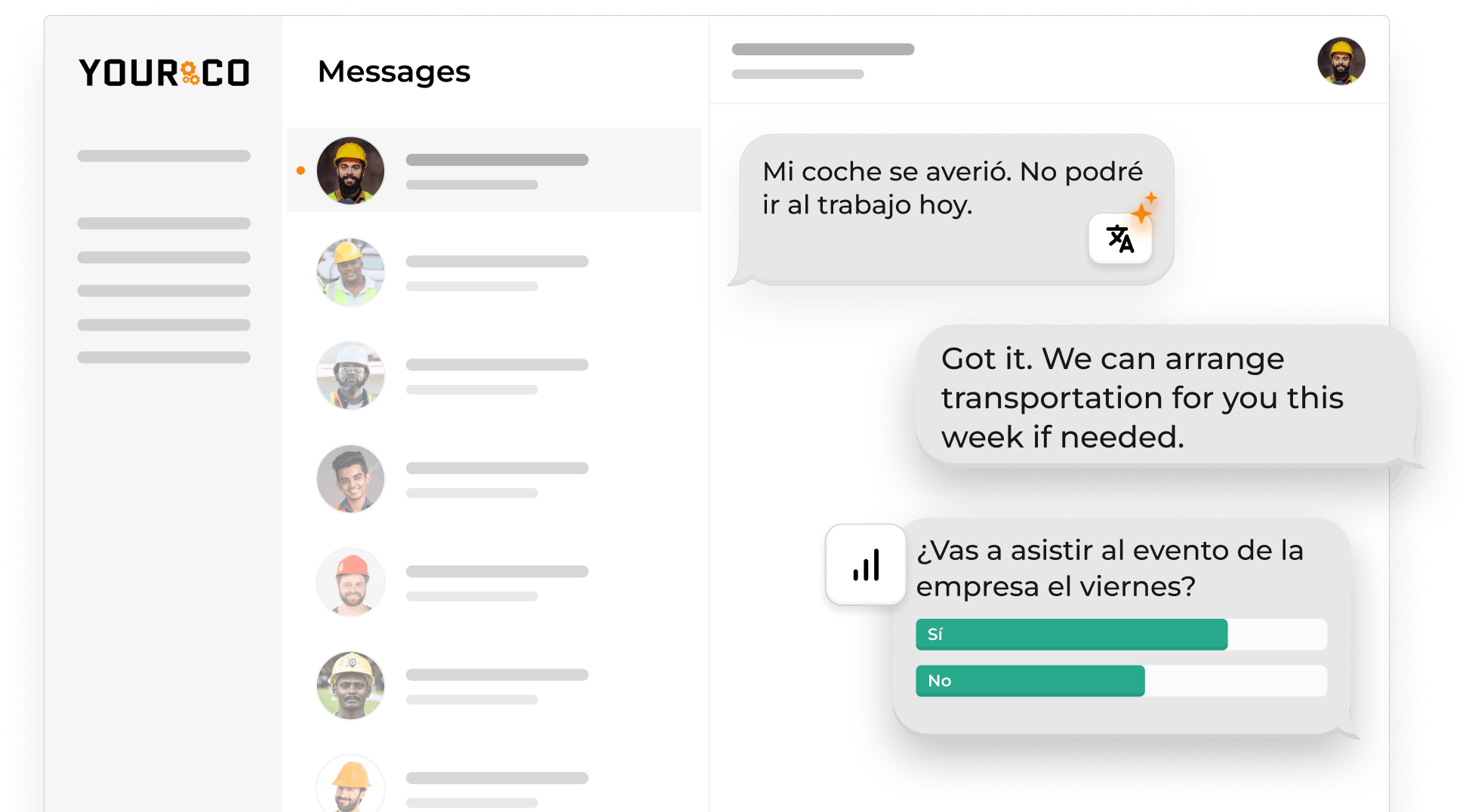
A federal training policy says an employer instructs employees "using both a language and vocabulary that the employees can understand." An English-only alert may not give a Spanish-speaking crew clear instructions. SMS-based platforms like Yourco use automatic message translation to remove the wait for a bilingual foreman to relay the message.
Confirm Receipt With Two-Way Replies, Not Delivery Reports
Clear communication during an evacuation means knowing who has moved. A "delivered" status is not the same as an acknowledgment from the worker.
Two-way SMS turns the number list into a roster. Ask for a single-key reply, "1 if safe, 2 if you need help," and the replies sort the crew in real time into confirmed safe, needs help, and silent. Silence triggers escalation: make a voice call, then dispatch a supervisor to the last known location. Every reply lands in a timestamped record showing whom the system alerted, when it sent the alert, and who confirmed.
Employers can keep that record with the emergency action plan described under Title 29 of the Code of Federal Regulations, section 1926.35, which includes procedures to account for employees after an emergency.
Drivers are the exception: federal texting rules restrict commercial drivers from texting while driving, so fleets often send a short "call dispatch when safely parked" text and treat the reply as delayed by design.
Keep Crew Phone Numbers Current and Test From the Work Areas
numbers current helps teams send safety alerts to the right workers without internet. Cybersecurity and Infrastructure Security Agency (CISA) guidance says employees should keep emergency contact information up to date. SMS-based platforms like Yourco can use Human Resources Information System (HRIS) and payroll integrations to add new hires and remove departed workers as source records change.
Test the SMS layer quarterly and follow the OSHA employee alarm system rule, which calls for employers to test supervised employee alarm systems at least annually. Each quarter:
- From the actual work areas, not the trailer, send a test alert and mark where it arrives late
- Compare replies against the site roster to identify dead numbers and missing subcontractors, then check whether the pre-scripted messages still match the current site layout and hazards
This information is for general awareness only. For specific compliance guidance, consult with qualified legal professionals.
Reach Every Crew on Basic Cellular Signal With Yourco
Yourco helps teams send safety alerts without internet over standard SMS, so one message from the dashboard reaches a rebar crew and a subcontractor's laborers on whatever signal their phones find. A driver at a rural rest stop can receive the same message. No app to install, no login to remember, and no Wi-Fi or data plan involved. Site leads segment alerts by location and role. They can also create shift-based groups and use scheduled messaging to send reminders ahead of forecast weather.
- Send SMS to any phone, including basic flip phones. Workers do not need to download an app.
- Workers can reply "safe" or "need help" through two-way messaging, and the roster fills itself
- Artificial intelligence (AI) translation covers 135+ languages and dialects, so each worker reads the alert in their own language
Yourco's 240+ system integrations across HRIS and payroll keep the alert list synced to who is on payroll today.
Enterprise Bridge gives corporate leadership a consistent way to send critical safety communication across locations while local managers maintain direct two-way communication with their own teams. Corporate gains greater visibility and consistency without taking away the flexibility local teams need.
Frontline Intelligence gives safety and operations leaders centralized visibility into alert acknowledgment speed across all sites. Safety leads can ask it directly:
Which sites take the longest to confirm "safe"?
- Which hazard type keeps recurring?
- What safety concerns are employees raising most often?
- Are the same hazards being reported across multiple sites?
Frontline Intelligence surfaces the sites where alerts go unanswered longest and the hazard patterns behind them, so issues that would otherwise stay buried in individual conversations show up at the corporate level without waiting on a site report.
"Yourco has been huge for us, especially during the weather crisis. We were able to keep our employees safe and make sure everyone was notified of updates in a timely manner."
— Scott Pfantz, Operations Manager, Nufarm - Alsip
After 90 days on Yourco, companies see two-way employee engagement reach 86%.
Try Yourco for free today or schedule a demo to test SMS alert delivery and worker replies in your company.

Frequently Asked Questions About Sending Safety Alerts Without Internet Access
How Do I Send Safety Alerts to Workers on a Job Site With No Internet Access?
To send safety alerts without internet, use standard SMS messages when the site has basic cellular signal but no Wi-Fi or mobile data. Texts use the cellular network rather than an internet connection. Include the hazard, location, required action, and time window, then ask workers to reply with a single key to confirm their status.
Does SMS Work Without Wi-Fi or a Data Plan?
Yes, SMS works without Wi-Fi or a mobile data plan as long as the phone can connect to a cellular tower. A temporarily unreachable phone may receive the message after it returns to coverage. SMS cannot be delivered immediately if the device has no cellular signal or the network delays delivery.
What if My Worksite Has No Cell Signal at All?
Use a registered signal booster when outdoor cellular coverage is weak, or consider compatible satellite messaging when there is no cellular coverage. Device and carrier support varies. In a true dead zone, combine remote messaging with an on-site audible alarm, radio, or another local method that reaches workers immediately.
How Do I Confirm Workers Actually Received a Safety Alert?
Ask each worker to reply, rather than treating a carrier delivery report as acknowledgment. SMS-based platforms like Yourco support two-way messages. Workers can respond with a simple status such as "safe" or "need help." Safety leads can then identify confirmed workers, people requesting help, and anyone who remains silent.
Do I Need Employee Consent to Text Safety Alerts to My Crew?
Consent and opt-out considerations can depend on the message, technology, and jurisdiction. The federal Telephone Consumer Protection Act (TCPA), Federal Communications Commission rules, and state requirements such as California's personal-phone reimbursement rules may affect workplace texting practices. Many employers address consent during onboarding and consult qualified legal counsel about their specific program.